Strong vs Weak Passwords: A Complete Path [2026]
 Introduction
As cyber threats continue to evolve, passwords remain one of the most critical layers of online security. Despite advances in authentication technologies, weak or reused passwords are still responsible for a large percentage of account compromises. In 2024 and 2025, understanding the difference between strong and weak passwords is essential to staying safe from phishing attacks and data breaches.
What Is a Strong Password?
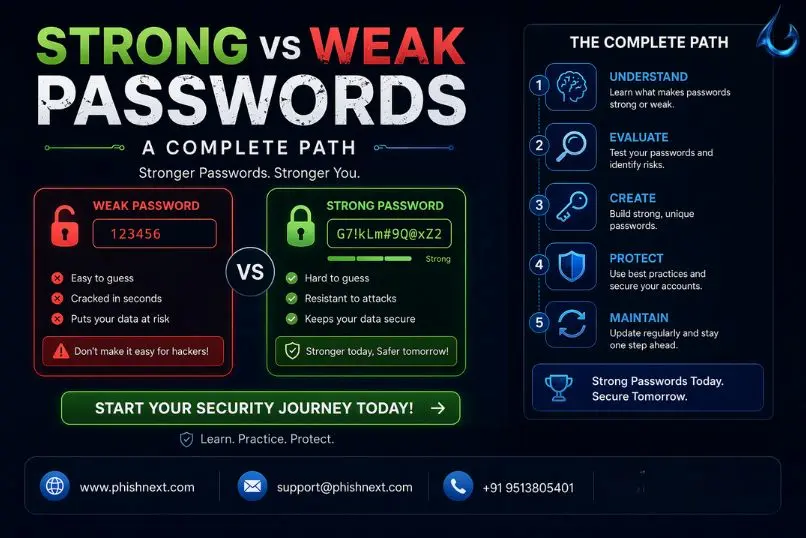
A strong password is designed to be difficult for attackers and automated tools to guess or crack. It should be long enough, ideally between twelve and sixteen characters, and include a combination of uppercase letters, lowercase letters, numbers, and special symbols. Strong passwords avoid dictionary words, personal details such as names or birthdays, and predictable patterns. Each account should use a unique password to reduce risk if one service is compromised.
Examples of Strong Passwords
T9$kL!4p@Z2024
Blue!River#Sun89
M@xSecure_2025!
Why Strong Passwords Are Effective
Strong passwords work because they are resistant to brute-force attacks, dictionary attacks, and credential-stuffing techniques. Their complexity and length significantly increase the time and computing power required to crack them, making them far less attractive targets for attackers.
Password Security Trends for 2025
In 2025, cybersecurity best practices are shifting toward better usability combined with stronger protection. Security experts recommend using passphrases made from multiple unrelated words, relying on password managers to generate and store credentials securely, and enabling multi-factor authentication to add an extra layer of security beyond passwords alone.
Strong Passphrase Example
Cloud!Tiger#Coffee$Moon25
What Is a Weak Password?
A weak password is easy to guess, easy to crack, or commonly reused across multiple platforms. These passwords often follow simple patterns or use information that can be easily found or predicted.Examples of Weak Passwords
- 123456
- password
- qwerty
- admin123
How Weak Passwords Enable Phishing Attacks
Phishing attacks trick users into entering their login details on fake websites or emails that look legitimate. When weak or reused passwords are entered, attackers can gain access to email accounts, social media profiles, and sensitive data. This access is often used to steal information, commit identity theft, or launch further phishing attacks using the victim’s identity.
ConclusionStrong passwords remain one of the simplest and most effective defenses against phishing and cyber attacks. As we move through 2024 and into 2025, adopting strong password habits, using passphrases, and enabling additional security measures can significantly reduce the risk of account compromise. Online safety begins with informed password choices.
Cybersecurity Insights
- Top 10 Best Phishing Simulation Tools In 2026
- How to Identify Fake Websites: A Beginner’s Guide to URL Safety
- Corporate Phishing Simulation Solutions in India
- The Hospitality Frontline: Managing Hotel Cybersecurity in the Age of ClickFix
- Ransomware Infection Incident Disclosed by Washington Hotel in Japan
- What Is Phishing Simulation? Complete Guide for Businesses
- Phishing Scam Targets India AI Impact Summit Attendees: Urgent Security Advisory
- AI and Vishing Social Engineering Risks Aiming Businesses
- Time Pressure is the Biggest Email Red Flag: Why?
- Top 10 Impactful Ways to Enhance Cybersecurity Awareness with Behavioural Insights
- Shipping-Themed Phishing Attacks Aiming at Middle East and Africa
- Phishing, Vishing, and MFA Attacks Target Enterprise Identity Systems
- Most Cmmon Passwords used in the Whole Year: Report
- Human Risk Management and Security Awareness Training