How to Identify Fake Websites: A Beginner’s Guide to URL Safety
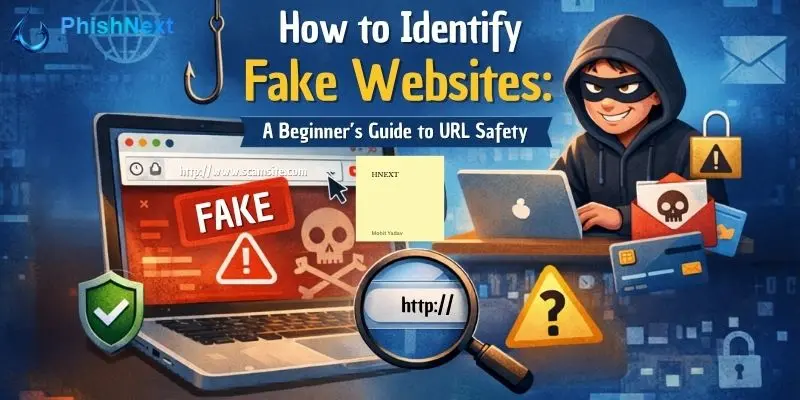
One of the most popular methods used by cybercriminals to deceive people online is fake websites. These websites, which range from fake banking pages to fraudulent retail sites and login portals, are made to appear authentic so that consumers will blindly believe them. It might be challenging for beginners to distinguish between a fake website and a legitimate one. For this reason, one of the most crucial aspects in maintaining online security is mastering URL safety.
We at PhishNext, which is regarded as one of the top phishing simulation service platforms in India, assist businesses and individuals in comprehending phishing techniques, spotting online dangers, and developing safer online practices. This book describes how fake websites operate, typical tactics used by attackers, and the simplest methods for spotting dubious URLs before they do any damage.
What Are Fake Websites?
Fraudulent websites designed to mimic reputable platforms, services, or brands are known as fake websites. Their primary goal is to trick people into divulging private information, such as passwords, usernames, bank account information, OTPs, email addresses, or login credentials for businesses. Additionally, some fake websites lead consumers to risky downloads or install malware.
These websites are frequently designed to resemble authentic ones. Attackers steal words, layouts, colors, and logos from reputable websites. Many people fall for these frauds since the page may seem authentic at first glance.
Phishing attacks frequently use fake websites. When a victim clicks on a link they get via email, SMS, WhatsApp, social media, or advertisements, they are taken to a page that appears to be reliable. The attacker immediately has their information once they enter it.
Why Fake Websites Are So Dangerous?
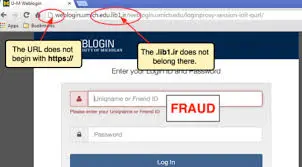
Because they are designed to take advantage of people’s confidence, fake websites are dangerous. When a website seems like a well-known bank, e-commerce site, government portal, or email service, people tend to believe what they see.
The genuine risk stems from how persuasive these websites can appear. A fraudulent website may:
● Take passwords and usernames.
● Record card and financial details.
● Convince people to download malicious software.
● Gather business and personal information.
● Take control of social media or email accounts.
● cause identity theft and monetary loss.
● Assist hackers in gaining access to corporate systems.
Fake websites can cause data breaches, internal compromise, credential theft, and reputational harm for firms. They may lead to account takeovers, emptied accounts, and loss of privacy for individuals. Because of this, being mindful of URL safety is now required.
Common Tricks Hackers Use to Create Fake URLs
Cybercriminals don't always make connections that seem suspicious at random. They frequently make tiny adjustments that are simple to overlook. Knowing these tips will make it much easier for you to spot fake websites.
Lookalike Domain Names
A web address created to mimic an actual domain is known as a lookalike domain name. Attackers make the URL appear nearly identical by adding or changing one or two letters.
For example:
● amaz0n.com instead of amazon.com
● paytm-secure.com instead of paytm.com
● faceb00k.com instead of facebook.com
These modifications may appear harmless at first glance, yet they are frequently sufficient to trick hurried users.
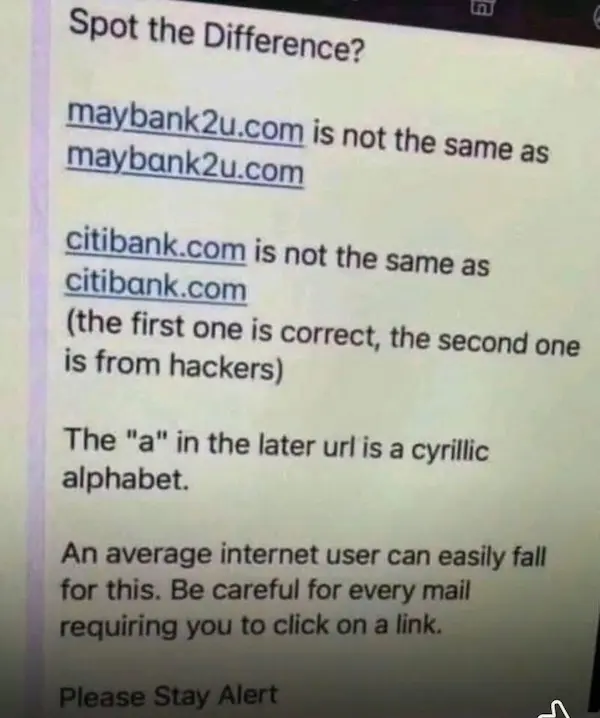
Using Different Alphabets (Homograph Attack)
Criminals utilize characters from different alphabets that physically mimic standard English letters in a homograph assault. Even if a false domain seems just like a legitimate one, its characters are actually different.
For instance, the letter "a" in a domain can be a Cyrillic character rather than a Latin one. Although the webpage appears correct to the human eye, the browser is opening an entirely new domain.
This kind of attack is particularly risky since even cautious users can overlook it if they don't utilize security tools or carefully examine the site.
Subdomain Tricks
Parts added to the primary domain name are called subdomains. This functionality is abused by attackers to make a URL appear legitimate.
For example:
● paypal.login-secure-check.com
● bankofindia.verify-user-alert.net
● amazon.account-reset.examplefake.com
Many users assume the website is authentic based just on the initial word, such as "PayPal" or "Amazon." However, the portion that comes before .com, .in, .org, or another extension is the actual domain. The true domains in the aforementioned instances are login-secure-check.com, verify-user-alert.net, and examplefake.com.
Subdomain Tricks
Since this is one of the most effective phishing strategies, it is worth repeating. In order to prevent people from checking once the brand name shows up, hackers purposefully craft lengthy and complicated URLs.
For example:
● secure-update.sbi.login-alert.com
● microsoft.verify-password-support.net
Although the trusted brand is only utilized within the subdomain, these URLs may appear convincing. The attacker actually owns the domain.
7 Easy Ways to Identify Fake Websites
To identify a dubious website, you don't have to be an expert in cybersecurity. The majority of phishing pages can be avoided with a few cautious inspections.
1. Check the URL Carefully
The first thing you should look at is the URL. Don't depend just on the brand name, logo, or site design displayed on the screen. Take your time reading the URL address.
Look for:
● The domain name contains misspellings.
● Strange words are added, such as secure, verify, login, or update.
● Unusual domain terminations
● Unusual hyphens or additional characters
● Instead of the primary domain, brand names are concealed in subdomains.
A legitimate business typically uses a tidy and reliable domain. Be wary of the URL if it seems unclear or a little strange.
2. Look for HTTPS (But Don’t Fully Trust It)
Many consumers believe that a website is safe if it has an HTTPS or padlock icon. This isn't always the case. HTTPS merely indicates an encrypted connection between your browser and the website. It does not ensure the legitimacy of the website itself.
HTTPS can also be used on a fake website. Because SSL certificates are inexpensive or free, attackers frequently install them. Therefore, HTTPS should never be your sole trust signal, even when it is superior to plain HTTP.
Consider HTTPS as a fundamental security layer rather than a means of verifying authenticity.
3. Check Domain Age
Phishing attacks frequently use recently created domains. It is a serious red flag if a website purports to be owned by a well-known business, but the domain was only registered a few days earlier.
To find out when a website was formed, you can utilize domain lookup tools. While fake websites can sprout out of nowhere and swiftly vanish after defrauding people, real organizations typically have a well-established domain history.
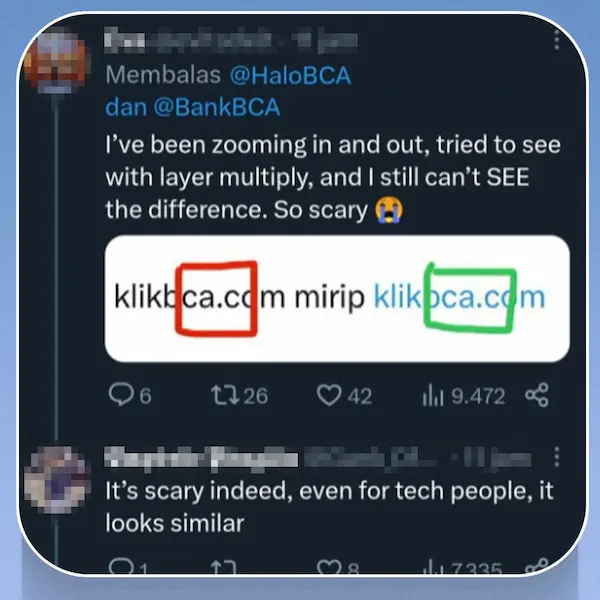
4. Analyze Website Design and Content
Although many fake websites appear legitimate, the deception is frequently exposed by subtle hints. Look for:
● Spelling and grammar mistakes,
● Poor formatting,
● Broken images or buttons,
● Low-quality design,
● Unusual pop-ups,
● Urgent messages like “verify now” or “account suspended,”
● Login pages that appear unexpectedly, etc.
Attackers occasionally replicate the homepage but neglect to ensure that other sites function properly. It's a warning sign if basic navigation seems inconsistent or broken.
5. Avoid Clicking Suspicious Links
Avoiding clicking on links from unidentified or unreliable sources is one of the safest practices. Use your bookmarks or manually type the official website into your browser instead of clicking on a link in an email or text message.
In order to force users to click rapidly, attackers frequently instill a sense of urgency or dread. Classic phishing techniques include messages like “your account will be blocked,” “payment failed,” or “urgent login required.”
Before you click, pause. A significant security issue could have been avoided by that little delay.
6. Check Contact Information
A legitimate website often offers appropriate contact information, business email addresses, customer assistance alternatives, privacy policies, and terms of service. Contact details on fake websites are frequently erroneous, duplicated, or questionable.
Among the warning indicators are:
● No contact page,
● Only a free email address,
● Fake-looking phone numbers,
● No company address, etc.
Legal pages were copied with incorrect brand names.
In order to earn customers' trust, a reputable company typically provides several methods of identification verification.
7. Use Security Tools
You can more successfully identify risky websites with the aid of security technologies. You may lower your risk by using browser protection, anti-phishing extensions, endpoint security software, and URL scanning tools.
Employers can take it a step further by teaching staff members how phishing websites operate in real-world situations with phishing awareness and simulation tools like PhishNext. Relying solely on instinct results in a far weaker protection than education combined with security technologies.
Real Example of a Fake URL (Explained)
Let's examine a straightforward example:
● Fake URL: www.paypal-login-secure.com
● Real URL: www.paypal.com
Since the fake URL appears to contain the word "PayPal," many users could instantly believe it. However, paypal-login-secure.com, not paypal.com, is the real domain.
Now let's look at another example:
Fake URL: paypal.verify-user-access.net
When they first see "PayPal," a lot of folks think it's official. However, verify-user-access.net is the actual domain. The term "PayPal" is merely a subdomain that deceives the user.
A genuine business domain is typically brief, dependable, and well-known. It can be fraudulent if the trusted brand name is combined with other words, hyphens, or comes before an entirely different domain.

Tools to Check Website Safety
Before visiting dubious websites, beginners can use a number of tools to examine them. These tools are helpful for verifying harmful indicators, reputation, blacklisting status, and domain age.
Among the often-utilized tools for website security are:
|
Google Safe Browsing |
Aids in determining whether a website has been marked as dangerous. |
|
VirusTotal |
Uses several security engines to scan URLs. |
|
WHOIS Lookup tools |
Display the age and details of the domain registration. |
|
URLVoid |
Offers blacklist and reputation checks. |
|
Sucuri SiteCheck |
Checks websites for signs of malware and recognized risks. |
|
Browser security extensions |
Avoid visiting dubious or hazardous pages. |
|
Endpoint protection software |
Prevents access to harmful websites. |
These tools are useful, but they should complement your judgment rather than completely replace it.
What to Do If You Visit a Fake Website
Don't freak out if you unintentionally visit a fake website. Quick action can lessen the harm.
Here's what you ought to do:
● Close the website right away.
● Don't input any login or personal information.
● Avoid downloading files from the website.
● If necessary, clear the cache in your browser.
● Conduct a device security scan.
● If you entered credentials, change your password right away.
● Turn on multi-factor authentication for significant accounts.
● Keep an eye out for questionable activity on bank or email accounts.
● Inform your IT staff, service provider, or browser security system about the fraudulent website.
Notify your IT or cybersecurity staff immediately if you entered company credentials. A bigger compromise can be avoided with prompt reporting.
Tips to Stay Safe Online
You can lessen your risk of becoming a victim of fraudulent websites by adopting safe browsing practices.
Observe these easy guidelines:
● Important website addresses should always be manually typed.
● Make use of bookmarks for shopping, email, and banking websites.
● Check dubious links before clicking.
● Steer clear of using links received over SMS or email to log in.
● Update the security on your device and your browser.
● Make use of multi-factor authentication and secure passwords.
● Learn about phishing threats for yourself and your team.
● When sending urgent or sentimental texts, exercise caution.
● Verify the domain as well as the appearance of the webpage.
● To develop practical security behaviors, use phishing awareness and simulation tools like PhishNext.
Employee awareness is one of the best ways for businesses to combat fake websites. Attackers frequently target individuals rather than just systems. Teams can recognize dubious URLs before they click by participating in regular phishing simulation exercises.
FAQs
About How to Identify Fake Websites
Q. 1: What is a fake website?
A fake website is a false website created to mimic a legitimate one in order to get sensitive data from users, such as bank account information, login passwords, or personal information.
Q. 2: How can I identify if a website is fake or real?
By closely examining the URL, searching for spelling errors, examining the domain name, verifying contact information, determining the age of the domain, and utilizing website security tools, you can spot a fake website.
Q. 3: Is HTTPS always a sign that a website is safe?
No, HTTPS does not always indicate that a website is secure. It just indicates that the connection is encrypted. HTTPS can also be used by phishing or fraudulent websites.
Q. 4: What is a phishing attack?
Phishing attacks are cyberattacks where thieves employ fake emails, messages, websites, or login pages that look authentic to fool users into divulging critical information.
Q. 5: How do hackers create lookalike URLs?
By altering one or two letters, adding more words, employing hyphens, substituting letters with numbers, or inserting reputable brand names inside deceptive subdomains, hackers can produce lookalike URLs.
Q. 6: What is a homograph attack in cybersecurity?
A homograph attack is a tactic used by attackers to make a fake website domain look exactly like a legitimate one by using characters from various alphabets that resemble regular letters.
Q. 7: Can fake websites steal my personal information?
Yes, usernames, passwords, credit card numbers, bank account information, email logins, OTPs, and other private or corporate data can be stolen via fraudulent websites.
Q. 8: What should I do if I accidentally visit a fake website?
Close the website right away, refrain from inputting any personal information, do a security scan, update any passwords that have been hacked, enable multi-factor authentication, and report the incident if necessary.
Q. 9: Are fake websites common in banking and shopping sites?
Indeed, fraudsters frequently utilize fake websites in banking, shopping, delivery, and payment-related scams because they are aware that consumers are more likely to trust those brands.
Q. 10: Which tools can I use to check if a website is safe?
To verify the security of a website, you can use tools like Google Safe Browsing, VirusTotal, WHOIS lookup services, URLVoid, Sucuri SiteCheck, browser security extensions, and endpoint protection software.
Conclusion
The purpose of fake websites is to trick, steal, and control people. They frequently employ reputable brand names, appear authentic, and use subtle visual cues to confuse consumers. However, even beginners may learn to recognize warning signs and be safe online with the correct information.
The secret is to take your time and conduct your research before putting your trust in any website. Examine the content of the website, look for questionable domain patterns, thoroughly check the URL, don't rely just on HTTPS, and employ website safety tools as necessary.
We at PhishNext, the top phishing simulation service platform in India, think that practical knowledge is the foundation of cybersecurity awareness. One of the best methods to lower the danger of phishing for both individuals and companies is to teach consumers how to recognize fake websites and dubious URLs. In order to book a slot to interact with our highly skilled phishing professionals, you can just call us directly at our hotline mobile number, +91-9513805401, and say the magical word, “PhishNext”.
Explore More Blogs
- Top 10 Best Phishing Simulation Tools In 2026
- Phishing Simulation: How It Works to Reduce Risk? | PhishNext
- What Is Phishing Simulation? Complete Guide for Businesses
- How to Identify a Phishing Website? | PhishNext
- What Is Open-Source Intelligence (OSINT)? | PhishNext
- Time Pressure is the Biggest Email Red Flag: Why?
- Phishing on Messaging Apps: How Attackers Use Teams, WhatsApp, SMS, and Slack?
- Phishing Attacks Are Imitating City & County Officials: FBI Alerted! | PhishNext
- Attackers Using LLMs to Create Phishing Pages in Real Time