Phishing, Vishing, and MFA Attacks Target Enterprise Identity Systems
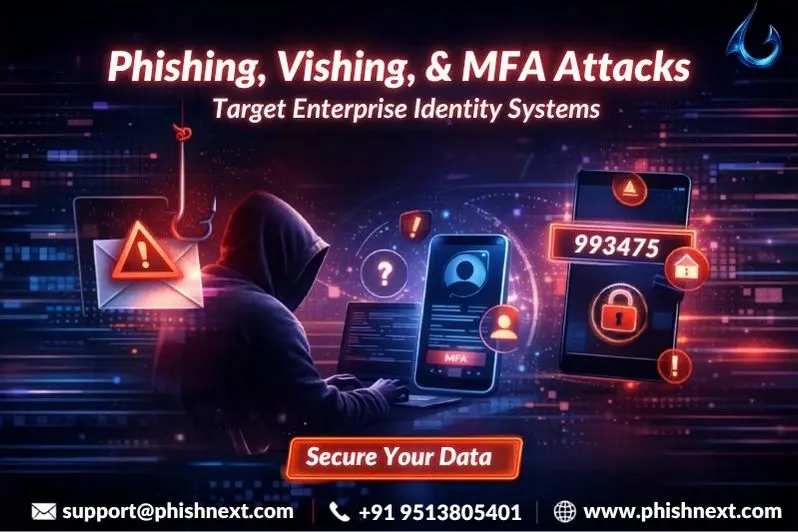
Do you know the difference between phishing, vishing, and MFA attacks that are constantly targeting enterprise identity systems? If not, then you are at the right place. Here, we will talk about how these things work and how you can secure yourself against them.
Moreover, we will suggest a dedicated phishing simulation platform, helping people to fight against future phishing attacks. What are we waiting for? Let’s get started!
What is Phishing?
Phishing is a dishonest hack in which perpetrators pose as reputable organizations like banks, coworkers, or well-known services like Last Pass in order to fool users into disclosing private information.
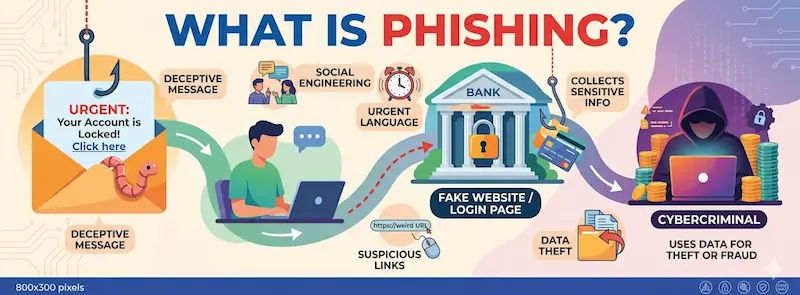
They trick users into clicking on malicious links in emails or texts by employing high-pressure techniques. These links take users to phony login pages that are intended to collect login credentials or install malware.
Because it focuses on human psychology rather than technological flaws and frequently gets over conventional security layers by using sophisticated social engineering, it continues to be a major concern.
What is Vishing?
Vishing, often known as "voice phishing," is a type of social engineering assault in which thieves pose as trusted authorities, such as bank employees or IT support, using phone calls or VoIP technologies.
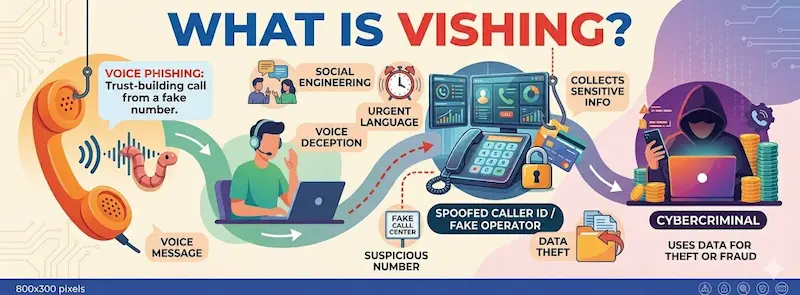
In order to deceive victims into disclosing MFA codes, credit card information, or login passwords, attackers frequently employ "caller ID spoofing" to make the call seem authentic and create a sense of urgency.
It is being utilized more frequently in "hybrid phishing" attacks, in which a phony email urges the victim to contact a phony support number in order to fix a fictitious account problem.
Key Threat Trends Emerging This Month
|
S.No. |
Trends |
What? |
|
1. |
Massive Disruption of "Tycoon 2FA" |
The Tycoon 2FA Phishing-as-a-Service platform was taken down on March 4 by an international law enforcement alliance headed by Microsoft and Europol.
Adversary-in-the-Middle (AiTM) attacks, which enable low-skilled criminals to circumvent MFA by intercepting live session tokens in real-time, were primarily motivated by this toolkit. |
|
2. |
"Forwarded Chain" Phishing Targeting LastPass |
An extremely complex effort emerged in which attackers sent fictitious internal email "forwarded chains." By posing as IT assistance and talking about an "account compromise," these emails deceive users into clicking on a link to a phony Single Sign-On (SSO) site in order to "verify" their master password. |
|
3. |
Surge in Interactive Vishing (Voice Phishing) |
Vishing is now the second most common infection vector (11% of all invasions), according to new research. Attackers are now persuading staff members to allow remote access using products like Microsoft Quick Assist through highly interactive, human-led calls that are frequently enhanced by AI voice cloning. |
|
4. |
The Rise of "Agentic" Phishing |
A startling 54% click-through rate is being attained by AI-powered phishing baits (as opposed to 12% for conventional techniques). These "agentic" attacks employ autonomous AI to scrape internal papers and social media in order to create hyper-personalized, flawless communications that reflect a company's unique "brand voice." |
|
5. |
Identity as the Primary Attack Surface |
This month, compromised identities accounted for more than 75% of breaches rather than software defects. Because it enables them to inherit a fully authorized browser session and totally disregard the requirement for a password or an MFA code, threat actors are increasingly concentrating on Session Token Theft. |
Cybercriminal Groups Scaling Vishing Operations
In the following ways, cybercriminal groups are scaling vishing operations:
- AI-Driven Voice Cloning: Attackers can now create "indistinguishable" impersonations that circumvent conventional human skepticism by using generative AI to mimic the voice of a target (such as a CEO or IT administrator) with as little as three seconds of audio.
- Automated "Scam Call Centers": Autonomous AI agents are being used by criminal organizations to operate completely automated call centers. These bots only transfer "high-value" victims to a real attacker, handling initial outreach and conversation at a scale that human calls could never accomplish.
- Multi-Channel "Hybrid" Phishing: "Omni-channel" campaigns include vishing. For instance, the success rate is increased by 4.5 times when a victim first receives an AI-generated email or SMS (Smishing), followed by a coordinated phone call to "confirm" the fraudulent request.
- Targeting "Tier-0" Help Desks: Vishing is being scaled by groups like Scattered Spider to explicitly target corporate help desks. They deceive support professionals into changing passwords or getting around MFA for high-privilege accounts by using compelling, native-level social engineering.
- Industrialization via "Vishing-as-a-Service": Vishing has evolved into a service, much like ransomware. In order to create "target profiles," lead generation bots crawl LinkedIn and corporate websites. These profiles are then sold to specialist vishing cells, which use pre-written, AI-optimized scripts to carry out the calls.
Tycoon 2FA Phishing‑as‑a‑Service Platform Disrupted
Tycoon 2FA was disrupted on March 4, 2026, when a worldwide coalition led by Microsoft and Europol seized 330 active domains that were being utilized by more than 500,000 enterprises to get around multi-factor authentication.
Security experts caution that even while the operation initially reduced traffic by 75%, the platform is already trying to rebuild, underscoring the enduring nature of "Adversary-in-the-Middle" (AiTM) threats.
AiTM (Adversary-in-the-Middle) Bypassing MFA Controls
|
S.No. |
Factors |
How? |
|
1. |
Real-Time Traffic Relaying |
In order to simulate a genuine login session, the attacker creates a proxy server that lies between the victim and the authentic website, transparently transmitting all data back and forth. |
|
2. |
MFA Interception |
When a Multi-Factor Authentication code is requested by a valid website, the proxy records the user's input and immediately sends it to the actual service. |
|
3. |
Session Cookie Theft |
Rather than simply stealing the password, the attacker obtains the "Session Cookie" that the server issues upon a successful login, which serves as a "digital passport." |
|
4. |
Authentication Factor Neutralization |
Because the server assumes the user has already undergone complete authentication, the attacker can completely circumvent the MFA requirement by exploiting the stolen session cookie. |
|
5. |
Persistence and Takeover |
To obtain complete account access, the attacker imports the stolen cookie into their own browser. To keep control, they frequently alter security settings or add their own recovery devices. |
Fake “Account Compromise” Email Chains Target LastPass Users
In the following ways, fake account compromise email chains target LastPass users:
● Fabricated Internal Conversations: Emails that seem to be a "forwarded" chain of internal communications between LastPass security agents or automated system logs describing an ongoing account attack are sent to victims.
● High-Stakes Alarms: Alarming triggers like "unauthorized vault export detected," "new recovery device registered," or even "legacy access request (Urgent if you are not deceased)" are used in the emails to elicit an emotional, automatic reaction.
● Display Name Spoofing: Because mobile email clients frequently conceal the real, unrelated sender address (such as [email protected]), attackers use "Display Name Spoofing" to make the sender appear as "LastPass Security Team" or "LastPass Support."
● Credential Harvesting via Fake SSO: The "secure your account" or "cancel request" links that are offered take users to a clever look-alike domain (the main one being https[:]//verify-lastpass[.]com) that imitates a genuine Single Sign-On (SSO) login page to harvest master passwords.
● Exploitation of Holiday Weekends: Similar to the January "Maintenance" campaign, these attacks are frequently scheduled during US holiday weekends (such as Martin Luther King Jr. Day or early March weekends) in order to take advantage of lower IT staffing and slower security team response times.
Credential Harvesting via Look-alike Domains
Attackers register URLs that use typosquatting or homograph assaults (e.g., 1astpass.com instead of lastpass.com) to visually trick people in order to obtain credentials through look-alike domains.
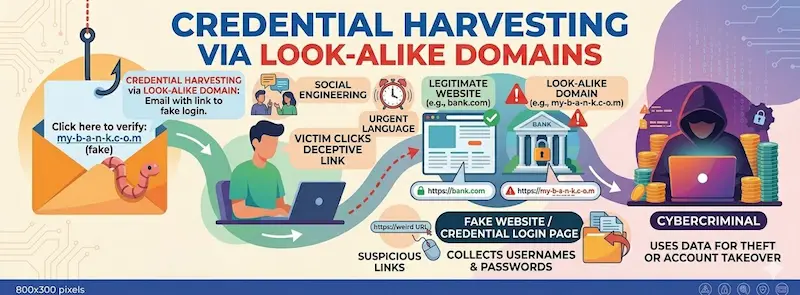
In order to fool victims into freely entering their usernames and passwords, which are then immediately recorded by the attacker's database, these malicious websites flawlessly mimic authentic login portals.
Social Engineering via Unauthorized Password Reset Requests
|
S.No. |
Topics |
Factors |
What? |
|
1. |
The Attacker's Strategy (Execution) |
Targeted Reconnaissance |
In order to appear credible, attackers search LinkedIn or company directories for an employee's email address, username, and even the manager's name. |
|
Triggering "MFA Fatigue" |
The victim's phone is inundated with genuine "Approve?" messages after the attacker launches dozens of genuine password reset requests. The victim must click "Yes" to end the commotion. |
||
|
Help Desk Deception |
Attackers pose as "distressed" executives or new hires who are "locked out" and require a bypass or an MFA device swap when they contact the company's IT assistance. |
||
|
Look-alike Recovery Portals |
In order to obtain the new password while the user "resets" it, they send a phony "Security Alert" email that contains a link to a flawlessly copied password reset page. |
||
|
Intercepting Reset Tokens |
Attackers fool the server into delivering the secret reset link straight to their server rather than the user's mailbox by using strategies like Host Header Poisoning. |
||
|
2. |
The Defensive Safeguards (Prevention) |
Phishing-Resistant MFA |
Use FIDO2/WebAuthn security keys (such as YubiKeys) in place of SMS or "Push-to-Accept" notifications so that they cannot be intercepted or "fatigued." |
|
Strict Help Desk Verification |
Establish "Callback" protocols that require IT to contact the employee back on a pre-registered number before to making any account modifications. |
||
|
Rate-Limiting & Lockouts |
Set up procedures to automatically lock an account if it gets too many requests to reset its password in a short period of time. |
||
|
Context-Aware Alerts |
In order for users to quickly identify a request coming from an unknown place, make sure they receive warnings that state, "A password reset was requested from [City, Country]". |
||
|
User "Stop-and-Think" Training |
Employees should be trained to report "Ghost Resets" to the security staff right away and to never approve a notification that they did not personally initiate. |
|
Note: To get a stress-free working environment, you can go for a specially designed tool, “PhishNext,” which provides specialized simulations of phishing attacks so that users can get used to such attacks and never become victims of such attacks. |
Explore Cyber Topics
- Top 10 Best Phishing Simulation Tools In 2026
- Phishing Simulation: How It Works to Reduce Risk? | PhishNext
- What Is Phishing Simulation? Complete Guide for Businesses
- How to Identify a Phishing Website? | PhishNext
- What Is Open-Source Intelligence (OSINT)? | PhishNext
- Time Pressure is the Biggest Email Red Flag: Why?
- Phishing on Messaging Apps: How Attackers Use Teams, WhatsApp, SMS, and Slack?
- Phishing Attacks Are Imitating City & County Officials: FBI Alerted! | PhishNext
- Attackers Using LLMs to Create Phishing Pages in Real Time