How to Identify a Phishing Website? | PhishNext
Do you want to know about “How to Identify a Phishing Website?” If yes, then you are at the right place. Here, we will talk about several amazing ways to recognize phishing websites and stop getting fooled.
Moreover, several websites have been created for this malicious purpose across a broad range. Thus, learning how to stop them is necessary. What are we waiting for? Let’s get started!
What is a phishing website?
A phishing website is a fraudulent website that poses as a trustworthy login page or service, like a bank or social media site, in order to fool you into entering important information. Once you provide your credit card details, login credentials, or other sensitive data, the attackers obtain it for financial fraud or identity theft.
These websites frequently imitate reputable companies using "typosquatting" or masked URLs, using social engineering to trick people into feeling secure. Let’s take a look at “How to Identify a Phishing Website?”
Top Six Tips for How to Identify Fraudulent Websites
The following are the Top Six Tips for How to identify fraudulent websites:
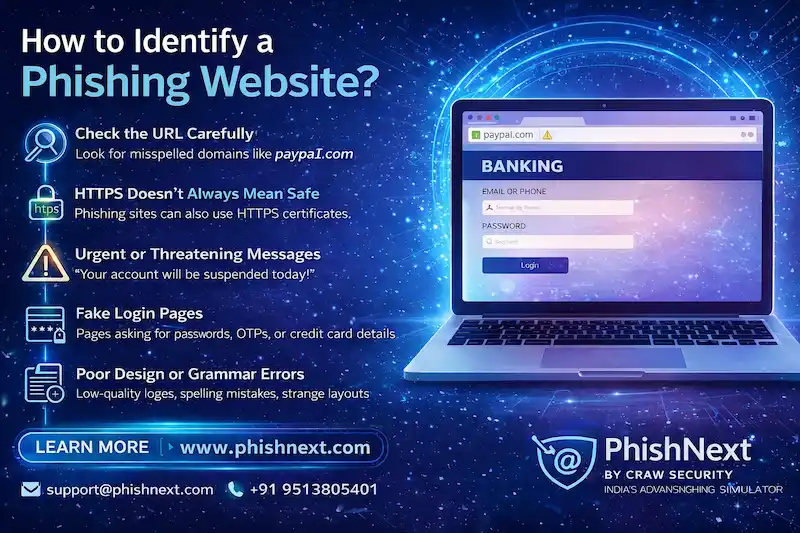
- Check the URL: Check for odd domain extensions that don't fit the brand or subtle misspellings like g00gle.com. Make sure the website has a working security padlock and uses https://, but keep in mind that scammers may now easily access these as well.
- Take a close look at the content: Look for broken links, low-resolution logos, and bad grammar that point to a hurried or unprofessional setup. While fraudsters frequently skimp on "About Us" pages and visual consistency, legitimate businesses spend on high-quality design.
- Think about your journey: Think about how you got to the website; if you clicked on an "urgent" link from an unwanted email or text, you should be wary. To avoid your critical thinking, fraudulent websites try to instill fear or provide "too good to be true" discounts.
- Read reviews: Look up the website name using keywords like "complaints" or "scam" on independent websites like Reddit or Trustpilot. Sites with no external footprint or a sudden influx of extremely generic, five-star ratings in a short amount of time should be avoided.
- Check payment methods: Secure solutions that provide buyer security, such as credit cards or PayPal, are given priority by legitimate businesses. Websites that need "irreversible" payments like gift cards, bitcoin, or wire transfers should be avoided at all costs.
- Find out who owns the website: To find out when and by whom the domain was registered, use a "Whois" lookup tool. It's probably a scam if a big brand's website was made just a few days ago or if the owner's information is concealed behind dubious proxy services.
Defending against phishing attacks and stopping people from visiting phishing websites
In the following ways, you can stop people from visiting phishing sites and defend against phishing attacks:
● Enforce Phishing-Resistant MFA: Use FIDO2-based authentication or hardware security keys to make sure that an attacker cannot get around the physical device requirement even if a password is obtained.
● Implement Strict Email Authentication (DMARC): Use the DMARC, SPF, and DKIM protocols to automatically prevent spoof emails from getting to user inboxes and to confirm the sender's authenticity.
● Deploy AI-Powered Security Gateways: Make use of sophisticated threat security, which employs machine learning to detect "zero-day" phishing websites before they are blocked by analyzing email intent and visual anomalies in real-time.
● Utilize DNS Filtering and Web Isolation: To protect the user's real device, utilize browser isolation to run untrusted URLs in a virtual container and block network access to known harmful sites.
● Run Realistic, Data-Driven Simulations: To teach staff members how to identify complex psychological triggers and report suspicious activity, conduct frequent, unexpected phishing tests based on current real-world lures.
Frequently Asked Questions
About How to Identify a Phishing Website?
- Does a padlock symbol in the browser address bar mean a website is safe?
No, the padlock does not indicate that the website owner is trustworthy or that the website is malware-free; rather, it just indicates that the connection is encrypted (HTTPS).
- What are the most common visual red flags of a phishing website?
The following are the most common visual red flags of phishing websites:
a) Mismatched or Low-Resolution Branding,
b) Generic or Urgent Call-to-Action Buttons,
c) Inconsistent Typography and Layout,
d) Broken Links & Non-Functional Icons, and
e) Grammar & Spelling Errors in UI.
- How do cybercriminals use "lookalike domains" to trick users?
In order to visually replicate reputable businesses and trick visitors into submitting credentials, cybercriminals register URLs with slight character substitutions, such as using "rn" instead of "m" or a zero instead of "o".
- What should I do if I’m unsure about a link I received in an email?
You should take the following steps if you’re unsure about a link received in an email:
a) Hover Before You Click,
b) Navigate Directly via Browser,
c) Use a URL Scanner,
d) Check the Sender's Full Address, and
e) Verify via a Different Channel.
- Why are traditional email security tools failing to stop these attacks?
Traditional email security tools are failing to stop these attacks for the following reasons:
a) Generative AI Removes "Human" Errors,
b) Lack of Contextual Awareness,
c) Polymorphic Evasion at Scale,
d) Exploitation of Trusted Infrastructure, and
e) The "Mobile Pivot" with QR Codes.
|
Note: To get a stress-free working environment, you can go for a specially designed tool, “PhishNext,” which provides specialized simulations of phishing attacks so that users can get used to such attacks and never become victims of such attacks. |
Recommended Reads
- Top 10 Best Phishing Simulation Tools In 2026
- Phishing Simulation: How It Works to Reduce Risk? | PhishNext
- What Is Phishing Simulation? Complete Guide for Businesses
- How to Identify a Phishing Website? | PhishNext
- What Is Open-Source Intelligence (OSINT)? | PhishNext
- Time Pressure is the Biggest Email Red Flag: Why?
- Phishing on Messaging Apps: How Attackers Use Teams, WhatsApp, SMS, and Slack?
- Phishing Attacks Are Imitating City & County Officials: FBI Alerted! | PhishNext
- Attackers Using LLMs to Create Phishing Pages in Real Time