How to Detect a Scam or Phishing Email in Just 10 Seconds?
Phishing emails remain one of the most effective tools used by cybercriminals to steal credentials, spread malware, and gain unauthorized access to systems. Despite advances in security technology, attackers still rely on one simple weakness: human trust. The good news is that you don’t need advanced technical knowledge to protect yourself. With the right awareness, you can spot most phishing emails in under 10 seconds.
This guide explains exactly how phishing emails work, why they succeed, and the quick checks anyone can use to identify them before it’s too late.
What Is a Phishing Email?
A phishing email is a fraudulent message designed to trick the recipient into taking a harmful action. This action may include clicking a malicious link, downloading an infected attachment, or entering login credentials on a fake website. These emails often appear to come from trusted sources such as banks, cloud services, colleagues, or well-known brands.
Once a victim interacts with the email, attackers can steal credentials, hijack accounts, access sensitive data, or launch further attacks inside an organization.
Why Phishing Emails Are So Dangerous
Phishing attacks do not rely on software vulnerabilities. Instead, they exploit human behavior such as urgency, fear, curiosity, and trust. One successful phishing email can lead to credential theft, data breaches, financial loss, and reputational damage. In many real-world incidents, phishing is the first step that leads to a full organizational compromise.
The 10-Second Phishing Detection Method
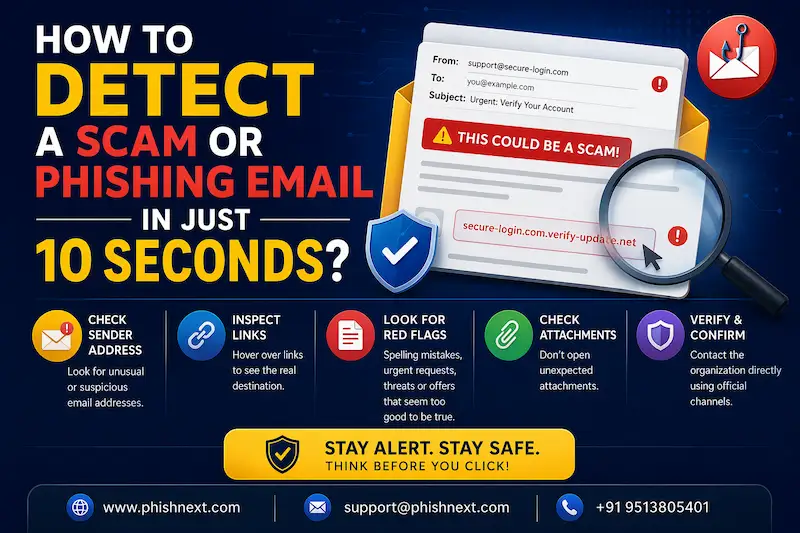
You don’t need to analyze an email for minutes to know whether it’s dangerous. Most phishing emails show clear warning signs that can be spotted almost instantly.
Check the Sender Address First
The sender name may look legitimate, but the actual email address often reveals the truth. Attackers commonly use misspelled domains, extra characters, or public email services to impersonate trusted organizations. If the sender’s email address looks unusual, mismatched, or unfamiliar, that alone is a strong indicator of phishing.
Look for Urgency or Pressure
Phishing emails often try to rush you into acting without thinking. Messages that claim your account will be locked, a payment is overdue, or immediate action is required are designed to create panic. Legitimate organizations rarely demand urgent action through email alone.
Hover Over Links Without Clicking
One of the fastest ways to spot a phishing email is to hover your mouse over any link. The preview URL often leads to a suspicious or unrelated website. If the link does not match the organization it claims to represent, do not click it. On mobile devices, be especially cautious, as link previews are harder to verify.
Watch for Generic Greetings
Many phishing emails start with vague greetings such as “Dear User,” “Dear Customer,” or “Hello Sir/Madam.” Legitimate organizations usually personalize emails with your real name or username. A generic greeting is often a sign of a mass phishing campaign.
Check for Poor Language or Formatting
While phishing emails have become more sophisticated, many still contain spelling mistakes, grammar errors, awkward phrasing, or inconsistent formatting. These small details can be spotted quickly and often indicate that the email is not legitimate.
Be Cautious with Attachments
Unexpected attachments are a major red flag. Phishing emails may include invoices, receipts, or documents you were not expecting. Opening these files can install malware or ransomware on your device. If you were not expecting an attachment, verify it before opening.
Ask Yourself One Simple Question
In under 10 seconds, ask yourself this question: Was I expecting this email? If the answer is no, treat the message with suspicion. Attackers rely on surprise to catch victims off guard.
Common Types of Phishing Emails
Phishing emails come in many forms. Some impersonate IT support asking for password resets. Others pretend to be delivery notifications, payment alerts, or shared documents. Business email compromise attacks may appear to come from managers or executives requesting urgent actions. Regardless of the theme, the core warning signs remain the same.
What to Do If You Suspect a Phishing Email
If you suspect an email is a phishing attempt, do not click links or download attachments. Report the email to your IT or security team if you are in an organization. Delete the email after reporting it. If you have already interacted with the message, change your passwords immediately and inform your security team.
Why Awareness Matters More Than Ever
Technology alone cannot stop phishing. Email filters and security tools reduce risk, but attackers constantly adapt. Cyber awareness turns people into a human firewall. When users can quickly recognize phishing attempts, organizations dramatically reduce their chances of suffering a breach.
How Phishing Simulations Help
Phishing simulation platforms help organizations train users in a safe environment. By exposing employees to realistic phishing scenarios, organizations build muscle memory and awareness. Over time, users learn to recognize attacks instinctively, often in just a few seconds.
Explore Cyber Topics
- Phishing on Messaging Apps: How Attackers Use Teams, WhatsApp, SMS, and Slack?
- How to Identify a Phishing Website? | PhishNext
- Top 10 Best Phishing Simulation Tools In 2026
- How to Identify Fake Websites: A Beginner’s Guide to URL Safety
- Corporate Phishing Simulation Solutions in India
- The Hospitality Frontline: Managing Hotel Cybersecurity in the Age of ClickFix
- Ransomware Infection Incident Disclosed by Washington Hotel in Japan
- What Is Phishing Simulation? Complete Guide for Businesses
- Phishing Scam Targets India AI Impact Summit Attendees: Urgent Security Advisory
- AI and Vishing Social Engineering Risks Aiming Businesses