Role of DMARC, DKIM & SPF in Preventing Phishing Emails
Do you know what the Role of DMARC, DKIM & SPF is in Preventing Phishing Emails? If not, then you are at the right place. Here, we will talk about how amazing these tools are and how professionals use them in a timely manner.
Moreover, we will introduce you to a reliable phishing simulation platform offered by a reputable VAPT service provider. What are we waiting for? Let’s get started!
What Are Phishing Emails?
Phishing emails are dishonest digital messages created by hackers to pose as reputable organizations like banks, coworkers, or well-known companies in order to trick recipients into disclosing private information like passwords or financial information.
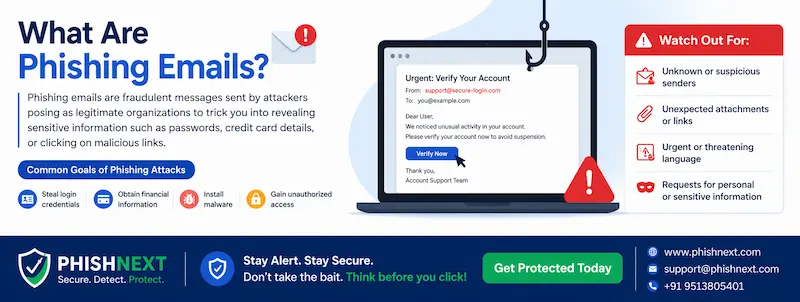
By 2026, these attacks will have changed from generic "spray-and-pray" messages to hyper-realistic, AI-generated communications that frequently include fake QR codes, malware attachments, or links that harvest credentials.
Phishing continues to be the principal entrance point for widespread data breaches and ransomware attacks across international businesses by taking advantage of psychological cues like haste, fear, or curiosity. Let’s take a look at the Role of DMARC, DKIM & SPF in Preventing Phishing Emails!
Why Are Phishing Emails Dangerous?
|
S.No. |
Factors |
Why? |
|
1. |
Gateway to Ransomware |
Malware that encrypts corporate networks and causes operational shutdowns and extortion demands worth millions of dollars is primarily distributed through phishing. |
|
2. |
Credential Harvesting and Account Takeover |
Attackers gain unauthorized access to private accounts and sensitive internal systems by using phony login pages to steal usernames and passwords. |
|
3. |
Financial Theft and Fraud |
Criminals deceive workers into approving fraudulent wire transfers or rerouting payroll payments to untraceable accounts by using Business Email Compromise (BEC). |
|
4. |
Massive Data Breaches |
One successful click can provide hackers the "foothold" they need to steal a significant amount of intellectual property and PII (personally identifiable information) from customers. |
|
5. |
Reputational and Legal Damage |
Following a phishing-related incident, businesses risk serious regulatory fines (such as GDPR or CCPA violations), a decline in customer trust, and long-term brand devaluation. |
The Vulnerability of Unauthenticated Email
The following are the vulnerabilities of unauthenticated email:
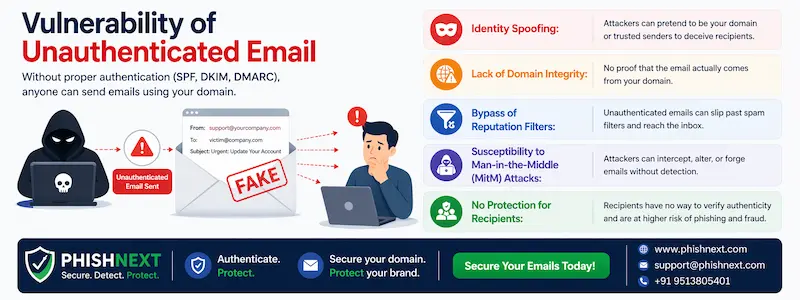
- Identity Spoofing: Without authentication, attackers have no technological difficulty forging the "From" address in order to pose as executives, brands, or reliable partners.
- Lack of Domain Integrity: Because unauthenticated email lacks a cryptographic "seal," recipient servers are unable to confirm that the message's content hasn't been changed during transmission.
- Bypass of Reputation Filters: Malicious senders can profit from the sender's absence of identification information because secure gateways frequently fail to accurately assign a "trust score" to unauthenticated mail.
- Susceptibility to Man-in-the-Middle (MitM) Attacks: Before they reach the intended destination, emails transmitted without protocols like TLS or DKIM may be intercepted, read, or altered by unauthorized persons.
- No Protection for Recipients: A domain owner cannot instruct other mail servers to reject phony emails purporting to be from their official domain in the absence of DMARC standards.
Overview of Email Authentication Protocols
The following is an overview of email authentication protocols:
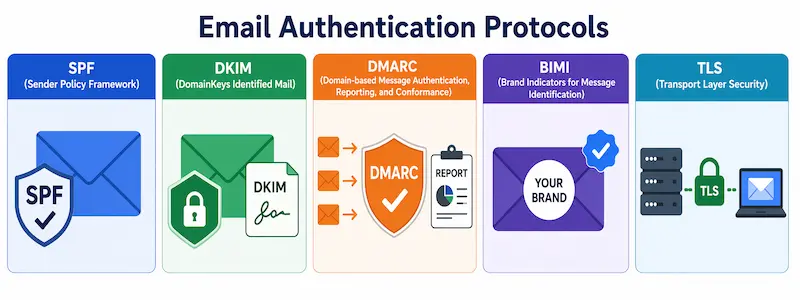
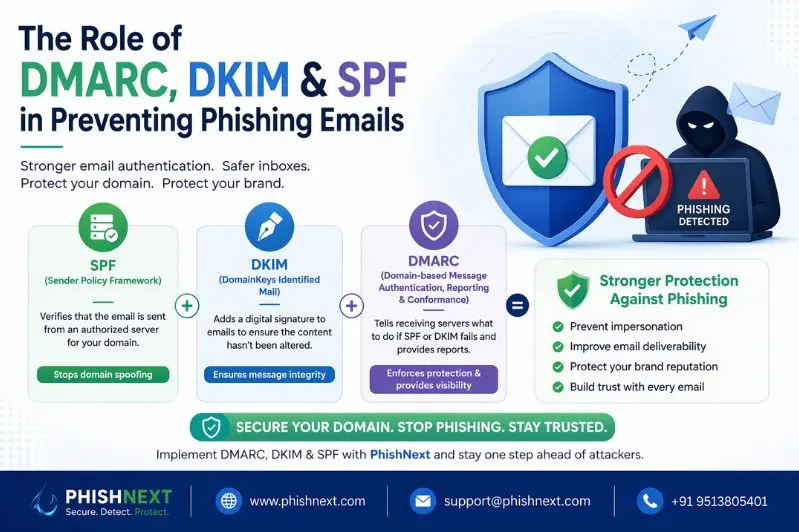
● SPF (Sender Policy Framework): A DNS-based record that identifies the precise IP addresses and servers that are permitted to send emails on your domain's behalf.
● DKIM (DomainKeys Identified Mail): Enables the recipient to confirm that the information was not changed in transit by adding a cryptographic digital signature to the email header.
● DMARC (Domain-based Message Authentication, Reporting, and Conformance): A policy layer that provides feedback reports to the sender and instructs receiving servers on how to handle emails that fail DKIM or SPF (e.g., quarantine or refuse).
● BIMI (Brand Indicators for Message Identification): When DMARC is implemented, your validated brand mark appears in the recipient's inbox with your email, acting as a visual proof of legitimacy.
● TLS (Transport Layer Security): Ensures that the communication is secret and unreadable while traveling over the internet by encrypting the connection between email servers.
What is SPF (Sender Policy Framework)?
A DNS-based security system called SPF (Sender Policy Framework) enables a domain owner to publish a list of approved IP addresses and mail servers that are allowed to send emails on their behalf.
In order to prevent unauthorized senders from impersonating the domain, the recipient's server examines this record upon receiving an email to confirm that it came from a reliable source.
How DKIM (DomainKeys Identified Mail) Ensures Integrity?
In the following ways, DKIM ensures integrity:
a) Cryptographic Digital Signature: A distinct, encrypted signature that reflects the message's contents is appended to the email header by DKIM.
b) Public Key Verification: To decrypt the signature and confirm the sender's identity, the receiving server obtains a public key from the sender's DNS records.
c) Tamper-Evident Hashing: The DKIM check will fail if any portion of the email content or protected headers is changed while in transit, since the hash values won't match.
d) Domain Ownership Linkage: The email is formally approved by the organization it purports to represent because the signature is directly linked to the sender's domain.
e) Persistence Through Forwarding: In contrast to SPF, a DKIM signature preserves the email's "seal of authenticity" until it reaches the intended recipient, even if it is forwarded through intermediary servers.
What Is DMARC?
A policy framework called DMARC (Domain-based Message Authentication, Reporting, and Conformance) tells receiving mail servers how to handle emails that don't pass authentication, bridging the gap between SPF and DKIM.
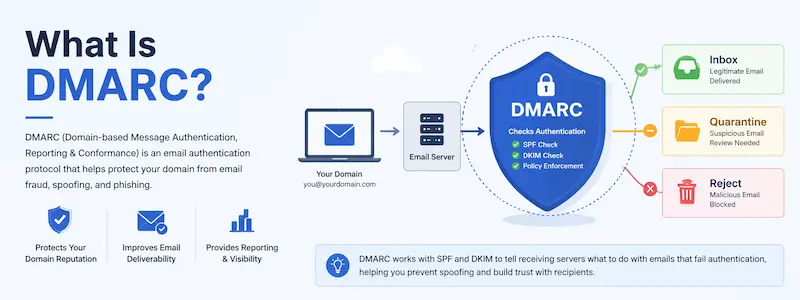
It gives domain owners fine-grained control so they may efficiently detect and stop spoofing efforts by monitoring, rejecting, or quarantining unwanted messages and getting comprehensive data.
Why does DMARC matter?
|
S.No. |
Factors |
Why? |
|
1. |
Enforcement of Security Policies |
For emails that don't pass authentication, it specifies certain automated actions (such as banning). |
|
2. |
Elimination of Exact-Domain Spoofing |
It prevents unauthorized attackers from sending fake messages using your exact brand domain. |
|
3. |
Visibility and Threat Intelligence |
It offers comprehensive feedback reports that pinpoint the precise individuals utilizing your domain to send emails worldwide. |
|
4. |
Boosts Email Deliverability |
Because ISPs consider verified mail to be "safe," your real communications will get into the inbox rather than spam. |
|
5. |
Foundation for Brand Trust (BIMI) |
In order to demonstrate credibility at a glance, it is a necessary prerequisite to show your official logo in the inbox. |
How DMARC, DKIM, and SPF Work Together?
The verification "ID cards" that demonstrate the message's integrity and the sender's authority are SPF and DKIM, respectively. As the "police officer" that examines these cards, DMARC adheres to a set of guidelines for whether to deliver, flag, or block the email depending on the findings.
Understanding Identifier Alignment
Making sure the domain discovered in the visible "From" address matches the domains validated by the underlying SPF and DKIM protocols is known as identifier alignment. Because it verifies that the verified sender identity truly relates to the brand the recipient sees in their inbox, this alignment is essential for DMARC success.
Key Benefits of Implementing DMARC, DKIM & SPF
|
S.No. |
Benefits |
What? |
|
1. |
Drastic Reduction in Brand Impersonation |
By establishing a cryptographic barrier, these protocols stop unauthorized attackers from successfully impersonating your domain in order to trick customers. |
|
2. |
Enhanced Global Deliverability |
Your legitimate emails are far more likely to land in the principal inbox rather than the spam bin since mailbox providers consider authenticated senders to be high-trust companies. |
|
3. |
Complete Visibility into Domain Usage |
Using the name of your company, DMARC reports offer a thorough map of all services that are now approved or not sending emails. |
|
4. |
Protection Against Financial Fraud |
Business Email Compromise (BEC) assaults are neutralized before they can reach employees and request unauthorized wire transfers by blocking fake emails at the gateway. |
|
5. |
Eligibility for BIMI and Visual Trust |
You can display your verified brand logo in the inbox, offering an instant visual sign of authenticity, if you follow these guidelines to the greatest levels. |
Step-by-Step Guide to Setting Up SPF
The following is a step-by-step guide to set up SPF:
- Identify Your Sending Sources: Make a detailed inventory of all the services that send mail on your behalf, such as marketing platforms, CRM tools, and your main email suite.
- Locate Your DNS Hosting Provider: Access the DNS settings for your domain by logging into the administration dashboard of your domain registrar (such as Cloudflare, GoDaddy, or AWS).
- Draft the SPF Record: Create a TXT record with v=spf1 at the beginning, followed by the ip4: or ip6: addresses of your local servers and the include: tags for your particular services.
- Choose Your Enforcement Tag: Ending the record with ~all (SoftFail) for testing or -all (Fail) for full security will help you decide how severely you want to handle non-compliant messages.
- Publish the TXT Record: In your DNS settings, add the finished string as a new TXT record. To prevent lookup issues, make sure each domain has a single SPF record.
- Verify the Implementation: Verify that the record is properly formed and stays under the required 10-lookup limit using an SPF record checker or lookup tool.
Step-by-Step Guide to Setting Up DKIM
The Following is a step-by-step guide to set up DKIM:
● Inventory Your Sending Domains: Determine every domain and subdomain that your company uses, and make sure that each one has a distinct DKIM signature.
● Generate the Public and Private Key Pair: To generate the cryptographic keys needed for signing and verification, use the admin dashboard of your email service provider or a specialized DKIM generator.
● Select a DKIM Selector: Give your DKIM record a distinctive name (such as "google" or "marketing") to enable several keys to coexist on the same domain without causing conflicts.
● Publish the Public Key to DNS: Make a copy of the produced public key and add it to your DNS settings under the designated selector subdomain as a TXT record.
● Enable DKIM Signing: After the DNS record has spread worldwide, go back to your email provider's settings and switch between the "Start Authentication" and "Sign Emails" options.
● Test and Validate: To verify that the digital signature is legitimate and properly aligned, send a test email to an external tool such as Mail-tester or perform an online DKIM lookup.
Step-by-Step Guide to Setting Up DMARC
|
S.No. |
Steps |
What? |
|
1. |
Confirm SPF and DKIM are Active |
Before starting DMARC, make sure both protocols are properly set up and in line with your domain to prevent blocking valid mail. |
|
2. |
Establish a Reporting Mailbox |
To receive and compile the XML feedback data from international mail providers, set up a specific email address (such as [email protected]). |
|
3. |
Start with a "None" Policy (p=none) |
Start with a monitoring-only policy that doesn't actually affect email delivery but lets you observe who is sending mail on your behalf. |
|
4. |
Publish to DNS |
Create a TXT record with your policy and the aggregate report (rua) destination at your domain's _dmarc hostname. |
|
5. |
Analyze the Reports |
Examine the incoming XML data using a DMARC monitoring tool to find any legitimate third-party services that still require authentication. |
|
6. |
Move to "Quarantine" (p=quarantine) |
Update your policy to send unverified emails straight to the recipients' spam folders once you are certain that all reliable sources have been validated. |
|
7. |
Reach Full Enforcement ("Reject") |
To complete your security posture, switch to p=reject, which tells mail servers to reject any illegitimate emails that appear to be from your domain. |
Common Misconfigurations
The following are some common misconfigurations:
a) Having Multiple SPF Records: A domain can only have one SPF record; more than one results in a permanent error (PermError), which leads servers to disregard both and fail authentication.
b) Exceeding the 10-Lookup Limit: If your record needs more than ten DNS lookups to resolve all "includes," which frequently occurs when employing an excessive number of third-party SaaS products, SPF tests will fail.
c) Missing Identifier Alignment: Even if the SPF or DKIM signatures are theoretically legitimate, authentication fails if the domain in the "From" header does not match the domain used in those signatures.
d) Syntax and Typo Errors: Small errors like misspelling or using a semicolon in place of a colon might invalidate the entire record and leave your domain exposed.
e) Setting "Reject" Too Early: Your own important business emails will be banned if you switch to a p=reject policy before identifying all legitimate sending services (such as payroll or HR tools).
How to Avoid Common Misconfigurations?
In the following ways, you can avoid common misconfigurations:
- Consolidate into a Single SPF Record: To prevent the PermError brought on by duplicate records, always combine many SPF strings into a single record, beginning with v=spf1 and concluding with a single qualifier (such as -all).
- Use SPF Flattening or Subdomains: Use "SPF flattening" services to change hostnames into IP addresses or relocate high-volume services, such as marketing tools, to dedicated subdomains (such as news.domain.com) if you surpass the 10-lookup limit.
- Monitor DMARC Aggregate Reports: Before implementing a more stringent policy, use a visualization tool to examine rua reports during your p=none phase in order to discover and align legitimate third-party senders.
- Utilize DNS Syntax Validators: Use a validator tool before publishing your SPF, DKIM, and DMARC strings to find typos, invisible characters, or erroneous semicolons that could render the records invalid.
- Verify Alignment for Every Service: Verify that your third-party vendors (such as Zendesk or Mailchimp) are set up to utilize your domain in the DKIM signature and "Return-Path" so that they match your "From" address.
BIMI (Brand Indicators for Message Identification)
Organizations can use the BIMI email standard to put their verified brand logo right next to their communications in the recipient's inbox. In order for it to work, the domain must be protected with a DMARC policy of "quarantine" or "reject," which offers a visual incentive for putting advanced security measures into place.
Best Practices for Preventing Phishing Attacks
The following are the best practices for preventing phishing attacks:
● Enforce Full Email Authentication: Put SPF, DKIM, and a DMARC "reject" policy into place to stop hackers from using your exact domain to impersonate clients or staff.
● Deploy AI-Powered Email Security: Instead of depending only on static blacklists, use contemporary behavioral analysis technologies that identify "fingerprints" of social engineering, such as odd sender behaviors or tone.
● Mandatory Multi-Factor Authentication (MFA): All accounts should have hardware security keys or app-based authenticators because they offer a vital safety net even in the event that a user unintentionally divulges their password.
● Continuous Awareness Training: To assist users in identifying minor warning signs like frantic language or dubious URL redirects, conduct frequent, realistic phishing simulations, and offer "just-in-time" training.
● Implement a "Report Phish" Culture: Turn your staff into a human firewall by offering an easy-to-use reporting button in the email client and rewarding staff members for reporting questionable messages.
Future of Email Security and Authentication Protocols
In 2026 and beyond, email security will move toward a "Identity-First" Zero Trust architecture, in which AI-driven behavioral analytics that instantly confirm the sender's intent supplement static protocols like SPF and DKIM.
Along with the required worldwide implementation of DMARC to counteract hyper-realistic, AI-generated phishing, we are witnessing the emergence of Authenticated Received Chain (ARC) to retain security during sophisticated forwarding.
Frequently Asked Questions
About Role of DMARC, DKIM & SPF in Preventing Phishing Emails
- What role do SPF, DKIM, and DMARC play in email security?
A tiered defense system made up of SPF, DKIM, and DMARC checks sender identity, safeguards message integrity, and applies automatic rules to prevent fraudulent emails.
- How does DMARC work with SPF and DKIM?
In the following ways, DMARC works with SPF and DKIM:
a) Authentication Check,
b) Alignment Verification,
c) Pass/Fail Determination,
d) Policy Enforcement, and
e) Reporting Feedback.
- What are three ways to prevent phishing?
The following are three ways to prevent phishing:
a) Enforce DMARC at "Reject" Policy,
b) Mandatory Multi-Factor Authentication (MFA), and
c) AI-Powered Behavioral Analysis.
- Does SPF prevent phishing?
By eliminating "Return-Path" spoofing, SPF offers a fundamental layer of protection. However, because it does not validate the visible "From" address and is easily circumvented by look-alike domains or forwarded emails, it is unable to prevent phishing on its own.
- Does DMARC protect against phishing?
DMARC prevents "look-alike" domains or hacked accounts from being used for phishing, but it does prevent exact-domain spoofing, in which an attacker uses your identical domain to send phony emails.
- What is the 4 email rule?
The following are the 4 email rules:
a) Email 1: The Value-Added Opener,
b) Email 2: The Social Proof Follow-up,
c) Email 3: The Low-Friction Ask, and
d) Email 4: The "Break-up" Email.
- Does DMARC require both SPF and DKIM to pass?
No, to obtain an overall DMARC "Pass" for the message, either SPF or DKIM must pass and match the "From" domain.
- What is DMARC in email?
DMARC is a security standard that allows domain owners to reject spoof emails and get use information by using SPF and DKIM results to confirm sender identity.
- Does DMARC work without SPF?
While using both is highly advised for best deliverability and security, DMARC can function without SPF as long as DKIM is correctly configured and aligned.
Conclusion
Now that we have talked about the Role of DMARC, DKIM & SPF in Preventing Phishing Emails, you might want to learn such skills to protect yourself against future phishing attacks. For that, you can get in contact with Craw Security, offering a dedicated phishing simulation platform, “Phish Next.”
Through this platform, practitioners will be able to test their knowledge & skills to evade phishing and get trained to deal with future phishing attacks. What are you waiting for? Contact, Now!
Popular Reads in This Category
- Huge Ransomware Attacks Rise in October 2025 Globally
- What Is Browser Detection & Response (BDR) in Cybersecurity?
- Guaranteed Publication in Chrome Web Store with New Malware Kit
- AI-Enabled Social Engineering Attacks are on the Rise
- Exposing How Sophisticated a Phishing Campaign is Bypassing M365 MFA
- How to Detect a Scam or Phishing Email in Just 10 Seconds?
- Why Do You Need PhishNext? [2026 Updated]
- Hidden Risks of Non-Compliance: What the Fines Hide?
- Nation-State Cyber Criminals Using AI to Streamline Targeting
- Strong vs Weak Passwords: A Complete Path [2026]