Exposing How Sophisticated a Phishing Campaign is Bypassing M365 MFA

A sophisticated phishing campaign has come upfront attacking North American businesses and experts. This attempt involves Microsoft 365 accounts (Outlook, Teams, OneDrive) via the OAuth 2.0 Device Authorization Grant flow that will bypass strong passwords & MFA.
In order to enter a device code provided by the attacker, the victim is redirected to the official Microsoft website (microsoft.com/devicelogin). In addition to authenticating the victim, this step grants the attacker's application a legitimate OAuth access token.
The attacker gains continuous access to the victim's Microsoft 365 accounts and business information when these tokens are stolen in real time.
Key Takeaways: Overview of the Campaign
● Novel Attack Mechanism: By not taking credentials, this effort gets beyond conventional security. Rather, the OAuth Access and Refresh tokens are obtained by polling the token endpoint after tricking the user into authenticating on the genuine Microsoft domain.
● Multi-Factor Authentication (MFA) Bypass: Since the token theft happens after the user successfully completes their authentic MFA challenge, the attack is very successful.
● Targeting: Targeting the tech, manufacturing, and financial services industries, the campaign is current and ongoing (it was first noticed in December 2025), and it is mostly centered in North America (more than 44% of victims are in the US).
● Major Impact: The stolen tokens give attackers long-term, comprehensive access to the Microsoft 365 environment, including administrative features and complete read/write/send capabilities for Calendar, Files (OneDrive/SharePoint), and Email.
● Immediate Mitigation: Important protections include evaluating recently consented OAuth applications immediately, looking for certain sender and subject patterns in email logs, and, for IT/Admin teams, thinking about using Conditional Access restrictions to disable the device code flow.
The Five-Phase Flow of Attack
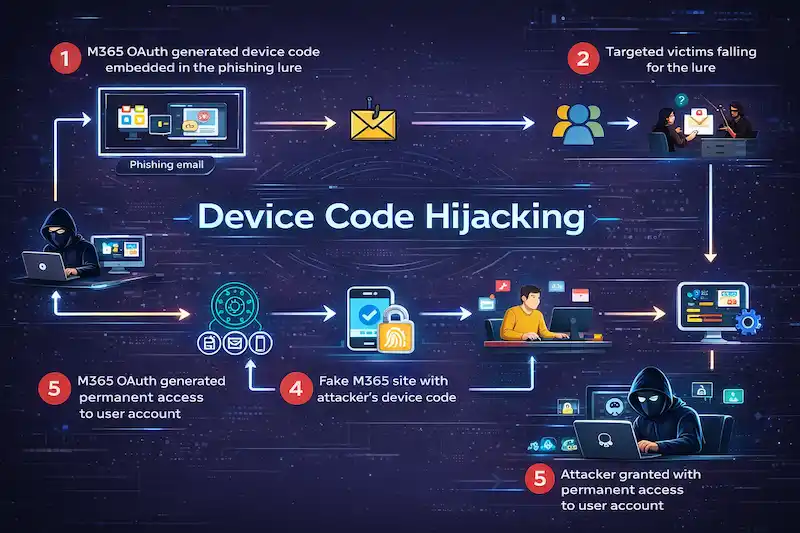
● Phase 1: M365 OAuth Device Code Generation & Lure: After creating a unique device code and registering on the M365 OAuth application, the attacker sends a targeted phishing email to the victim.
● Phase 2: Targeted Victims Fall for the Lure: After receiving the phishing email, the victim clicks on the infected link.
● Phase 3: Attacker-Controlled Landing Page (Fake M365 site): The victim is taken to the page under the attacker's control, where they are asked for their email address, presented with the attacker's device code, and instructed to finish "Secure Authentication."
● Phase 4: User Authentication on Legitimate Microsoft Portal: After visiting the official Microsoft site (https://microsoft.com/devicelogin), the victim inputs the attacker's device code and authenticates successfully using their genuine credentials and multi-factor authentication.
● Phase 5: Token Theft and Persistent Access: The attacker quickly obtains a legitimate OAuth access token from the Microsoft Identity Platform. This gives the attacker long-term, continuous access to the victim's Microsoft Office 365 account.
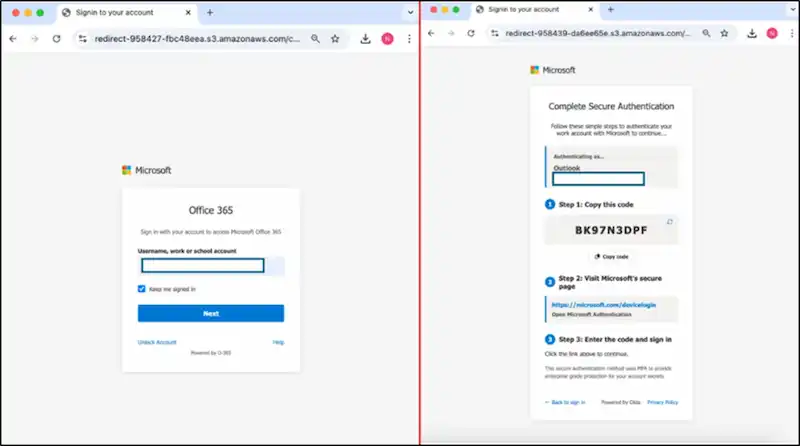
An illustration of user authentication and a landing page under attacker control.
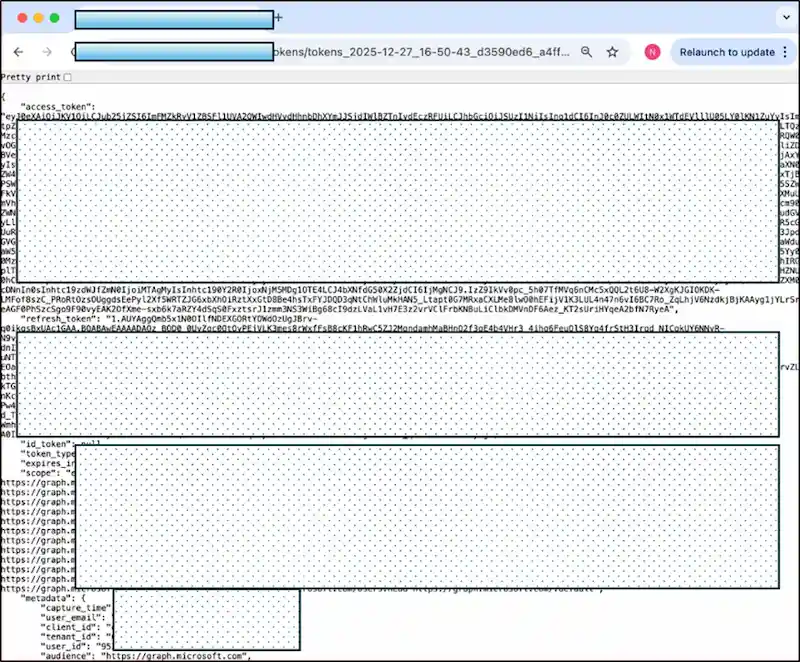
An illustration of a compromised OAuth token that was taken from the attacker's C2C.
Observations of Real-World Phishing Lures
|
Lure Type |
Subject Line Example |
Tactic/ Hook |
|
Fake Payment Confirmation |
REF-UIVJRW EFT Confirmation: Payment for Distribution Notice Completed |
Suggests a short processing window of 1-2 working days and instills a sense of urgency around a sizable electronic payments transfer of $125,000 USD. |
|
Fake Document Sharing |
[Name of Contact] The "Q4 Profit-related Salary Bonus Distributions Form – Year 25" document was shared. |
Uses a financial incentive (salary bonus) as a hook to mimic a Google Drive document sharing notification. |
|
Voicemail Notification |
Voice Mail [External Email] (925 seconds) |
To attract the user's attention and persuade them to click on a "Listen to Voicemail" call-to-action, a fake voicemail notice with an abnormally extended duration is used. |
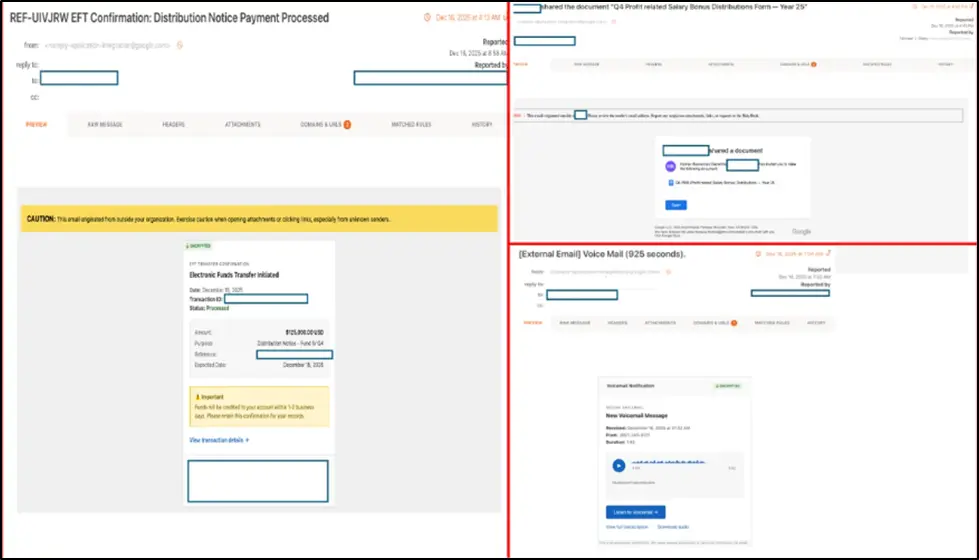
The Security console displays real-world phishing bait examples.
Indicators of Compromise (IOCs) and Actionable Defense
|
IOC Type |
Examples |
|
Sender Address |
|
|
Malicious Domains |
logon[.]sharefileselfservices[.]cloud, sso-services[.]com, newcrowdcapital[.]com |
|
Cloud Storage URLs (Infrastructure) |
storage[.]cloud[.]google[.]com/.../check[.]html, storage[.]cloud[.]google[.]com/.../captcha[.]html |
|
Subject Patterns |
Voice Mail (### seconds), ####### Confirmation: Distribution Notice Payment Processed, #### Shared document: "Q4 Profit related Salary Bonus Distributions Form — Year 25" |
Prompt Measures (For Security Teams)
- Block IOCs: Include all known dangerous URLs and domains in the block lists of your web proxy and email gateway.
- Hunt for Compromise: Look for the sender pattern in the email logs that contain the topic patterns that have been detected.
- Audit OAuth Applications: Review and immediately withdraw authorization for any unknown or questionable OAuth apps in the Microsoft 365 Admin Center.
- Review Sign-in Logs: Examine device code authentication events in Azure AD sign-in logs and look for sign-ins from odd geographic areas.
Strategic Controls for Administrators and IT
- Consider Disabling Device Code Flow: If your company does not need to use the device code flow for public or shared devices, then completely remove this attack vector.
● PowerShell Command: Update-MgPolicyAuthorizationPolicy -AllowedToUseDeviceCodeFlow $false
- Implement Conditional Access: Implement restrictions that rigorously limit who can utilize the device code flow and when.
- Monitor Consent: To monitor and control OAuth app consent, implement Microsoft Defender for Cloud Apps.
Applying an Approach to Human Risk Management (HRM)
Security teams can no longer afford to "wait and see" in the face of fast-changing techniques like this OAuth token theft effort. This attack demonstrates the shortcomings of conventional perimeter defenses and basic credential checks by taking advantage of a legitimate Microsoft domain and evading Multi-Factor Authentication.
In order to combat these advanced dangers, organizations need to act fast.PhishNext provides the necessary framework to do this by dismantling the traditional silos between real-time threat intelligence and user awareness.
Converting these actual phishing attempts into de-fanged phishing simulations is one of the best strategies to develop a response. Users will be able to recognize and report social engineering dangers instantly thanks to this highly accurate, contextual training.
|
Note: To get a stress-free working environment, you can go for a specially designed tool, “PhishNext,” which provides specialized simulations of phishing attacks so that users can get used to such attacks and never become victims of such attacks. |
Continue Reading
- AI and Vishing Social Engineering Risks Aiming Businesses
- Time Pressure is the Biggest Email Red Flag: Why?
- Top 10 Impactful Ways to Enhance Cybersecurity Awareness with Behavioural Insights
- Shipping-Themed Phishing Attacks Aiming at Middle East and Africa
- Phishing, Vishing, and MFA Attacks Target Enterprise Identity Systems
- Most Cmmon Passwords used in the Whole Year: Report
- Human Risk Management and Security Awareness Training