How to Detect Phishing Emails Before They Compromise Security?
Do you know what Phishing Emails are and how it impacts the security of an organization’s data confidentiality? If not, then you are at the right place. Here, we will talk about what Phishing Emails and how you can protect yourself against such attacks.
Moreover, we will introduce you to a reliable phishing attack simulator offered by a reputable VAPT service provider. What are we waiting for? Let’s get straight to the topic!
What are phishing email threats?
Phishing email threats are malicious social engineering attacks in which cybercriminals use phony emails posing as reputable companies, such as corporate IT departments or banks, to take advantage of human psychology rather than technological flaws.
To fool people into disclosing extremely private information, including credit card details and login credentials, or unintentionally downloading harmful malware and ransomware, these messages purposefully instill a false sense of urgency or anxiety.
In the end, a single employee falling for one of these phony letters may be the first point of entry for a disastrous organizational data breach. Let’s take a look at what Phishing Emails are and what impact they have!
How Do Phishing Emails Work?
|
S.No. |
Factors |
How? |
|
1. |
Target Reconnaissance |
Attackers obtain personal information about their victims by scraping social media, public profiles, and data breaches. |
|
2. |
Weaponization and Engineering |
To imitate reputable brands, threat actors create harmful attachments, spoof email templates, or replicate login pages that seem authentic. |
|
3. |
The Launch and Delivery |
In order to get over basic spam filters, fraudulent emails are sent out using hacked accounts or domain-spoofing tactics. |
|
4. |
The Psychological Hook |
The message scares the target into acting right away by creating a sense of urgency, terror, or financial incentives. |
|
5. |
Harvesting and Exploitation |
When the victim opens an attachment or clicks a link, they immediately give over their login information or allow malware to infiltrate their device. |
Why Phishing Email Attacks Are Increasing?
Phishing email attacks are increasing for the following reasons:
1. The Proliferation of Generative AI: AI is used by scammers to quickly create faultless, customized phishing emails on a large scale.
2. Low Barrier to Entry via Phishing-as-a-Service (PaaS): On the dark web, amateur hackers can purchase pre-made phishing kits at a low cost.
3. Exploitation of Hybrid and Remote Workplaces: Decentralized workers are more easily tricked outside of an office because they rely on digital conversation tools.
4. Highly Lucrative Returns on Investment (ROI): A single successful assault can result in millions of dollars in ransomware or data theft, and it is inexpensive to do.
5. The Complexity of Modern Digital Ecosystems: There are countless new login windows to spoof due to the proliferation of third-party SaaS software.
The Role of AI in Modern Phishing Attacks
The following are some of the roles of AI in modern phishing attacks:
● Elimination of Telltale Grammar Errors: By eliminating the spelling and grammar errors that typically reveal scams, generative AI produces flawlessly fluid, expert language.
● Automated Reconnaissance and Hyper-Personalization: In order to create highly customized spear-phishing messages that target certain victims, AI algorithms quickly collect public internet data.
● Unprecedented Scale and Speed: In a fraction of the time it takes for people, automated systems simultaneously launch millions of extremely distinct, localized phishing variations.
● Multimedia Deepfakes and Spoofing: Attackers use email lures and artificial intelligence (AI) speech and video clones to impersonate clients or business executives.
● Polymorphic and Filter-Bypassing Tactics: AI continuously modifies email text layouts and rewrites code, making it impossible for conventional security filters to identify recognized threat signs.
Common Types of Phishing Email Scams
|
S.No. |
Types |
What? |
|
1. |
Deceptive Phishing (Mass Phishing) |
In order to obtain credentials, attackers send automated, generic emails to millions of random recipients that impersonate well-known companies. |
|
2. |
Spear Phishing |
Hackers target a particular person or organization by crafting highly personalized emails using personal information. |
|
3. |
Whaling (CEO Fraud) |
High-level spear phishing targeted executives, such as CEOs or CFOs, in order to approve large-scale financial transactions. |
|
4. |
Clone Phishing |
A legitimate email that has already been delivered is intercepted by scammers, who then replicate it and replace the authentic link or attachment with a harmful one. |
|
5. |
Business Email Compromise (BEC) |
In order to deceive suppliers, staff, or customers into paying fictitious invoices, attackers compromise a legitimate company email account. |
Key Signs of a Phishing Email You Should Never Ignore
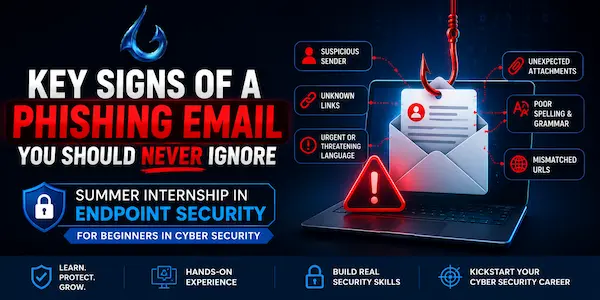
The following are some key signs of a phishing email you should never ignore:
a) Artificial Urgency and High-Pressure Tactics: Demands quick response by threatening to suspend accounts or impose legal penalties in order to create fear.
b) Mismatched or Domain-Spoofed Sender Addresses: Although the display name appears authentic, the real email address has random characters or subtle misspellings.
c) Suspicious or Generic Greetings: Uses generic terms like "Valued Member" or "Dear Customer" in place of your real name.
d) Hidden, Misspelled, or Hyperlinked URLs: The destination website that appears when you hover over a link is different from the company's official domain.
e) Unusual Requests for Sensitive Actions: Requests that you use email to transfer company funds, confirm passwords, or get around common security measures.
How to Identify Suspicious Links, Attachments, and Sender Addresses in a Phishing Email?
You can identify suspicious links, attachments, and sender addresses in a phishing email in the following ways:
1. Suspicious Links: To see the actual destination URL, move your mouse over the hyperlink without clicking. Pay particular attention to any tiny typos, subdomains, or entirely unrelated website addresses.
2. Attachments: Never open unusual files from senders you haven't checked. Check the file name extensions for hidden or harmful forms (such as.exe,.scr,.vbs, or double extensions like .pdf.exe).
3. Sender Addresses: Check for altered characters, extra hyphens, or generic public domains (like @gmail.com) claiming to represent a corporation by looking beyond the visible display name to confirm the actual domain path behind the "+" symbol.
Real-World Phishing Examples and Case Studies
|
S.No. |
Factors |
What? |
|
1. |
The Facebook and Google Invoice Fraud (2013–2015) |
A lone con artist successfully tricked both IT giants into sending over $100 million by posing as a reputable hardware vendor using falsified corporate invoices and phony email accounts. |
|
2. |
The Sony Pictures Nation-State Hack (2014) |
Spear-phishing emails with malware attachments were sent to Sony officials by state-sponsored hackers, who gained access to the network to expose confidential personnel information and unreleased movies. |
|
3. |
The Ubiquiti Networks Whaling Attack (2015) |
Through targeted emails to the company's finance department, fraudsters pretended to be senior executives and tricked staff into sending $46.7 million to unapproved foreign bank accounts. |
Best Practices to Protect Yourself from a Phishing Email Attack
The following are the best practices to protect yourself from a phishing email attack:
● Implement Multi-Factor Authentication (MFA): Turn on multi-factor authentication (MFA) for every account to prevent hackers from using stolen passwords alone.
● Verify Through a Secondary Channel: Verify any unexpected or urgent request by calling or texting the sender at a known, reliable number.
● Think Before You Click or Download: Before dealing with any unusual links or files, take a moment to assess the sender's legitimacy and intent.
● Keep Software and Systems Updated: To address weaknesses that malware takes advantage of, patch your operating system, browsers, and security programs on a regular basis.
● Use Advanced Email Filters and Security Tools: Use anti-phishing software and strong spam filters to stop questionable emails before they reach your inbox.
What to Do If You Receive a Phishing Email?
You should do the following things if you receive a phishing email:
a) Do Not Interact: Under no circumstances should you respond to the sender, download anything, or click any links.
b) Verify the Request Internally: If the email purports to be from a trusted firm or coworker, contact them immediately via their official website or a known, independent phone number. Never utilize the email's given contact information.
c) Report the Incident: Use the "Report Phishing" feature that comes with your email provider, or send the message to your company's internal IT security staff so they can stop the threat worldwide.
d) Mark as Spam and Delete: To avoid unintentional clicks later, transfer the reported email straight to your spam folder and permanently remove it from your trash can.
e) Alert Your Team: Notify your colleagues right away if the email appears to be from an inside department (such as IT or HR) to alert them to a targeted, ongoing attack on the workplace.
Conclusion: Staying Safe from Phishing Email Threats
Now that we have talked about what Phishing Emails are, you might want to learn more about the prevention tasks you can do to protect yourself. For that, you can go for PhishNext, a dedicated phishing attack simulator offered by Craw Security.
The amazing PhishNext can help users to confront various types of phishing attacks, and with time, users will be able to evade them with ease. Thus, you can trust this platform to be safe in the future. What are you waiting for? Contact, Now!
Frequently Asked Questions
- About Phishing Emails
1. What is a phishing email?
Phishing emails are misleading messages sent by hackers posing as reputable organizations in an attempt to fool people into divulging private information, opening harmful links, or downloading malicious software.
2. How can I identify a phishing email?
You can identify a phishing email in the following ways:
a) Analyze the Sender's Domain,
b) Inspect Links Without Clicking,
c) Look for Artificial Urgency,
d) Evaluate the Greeting and Language, and
e) Scrutinize File Attachments.
3. What are the most common types of phishing email attacks?
The following are the most common types of phishing email attacks:
a) Deceptive Phishing (Mass Phishing),
b) Spear Phishing,
c) Whaling (CEO Fraud),
d) Clone Phishing, and
e) Business Email Compromise (BEC).
4. Why do phishing emails create a sense of urgency?
Phishing emails create a sense of urgency for the following reasons:
a) Bypasses Rational Thinking,
b) Triggers a Fear Response,
c) Exploits Cognitive Biases,
d) Capitalizes on Workplace Habits, and
e) Provokes Impulsive Actions.
5. Is it safe to open a phishing email?
If you don't click on any links, download any attachments, or respond to a phishing email, it's usually secure, but doing so runs the danger of letting attackers know that your account is active.
6. What should I do if I receive a phishing email?
If you receive a phishing email, you should do the following tasks:
a) Do Not Interact,
b) Verify Through a Separate Channel,
c) Report the Message,
d) Delete the Email Permanently, and
e) Monitor Your Accounts.
7. Can phishing emails bypass spam filters?
Yes, phishing emails can evade spam filters by employing sophisticated strategies such as taking over authentic sender accounts, hiding dangerous URLs behind reputable cloud hosting services or redirections, hiding text behind images, and changing code layouts.
8. What happens if I click on a phishing email link?
If you click on a phishing email link, the following things happen:
a) Trigger a Drive-By Download,
b) Expose You to a Credential-Harvesting Site,
c) Install a Keystroke Logger,
d) Allow Session Hijacking, and
e) Leaking of Device Data and Location.
9. How can businesses protect employees from phishing email attacks?
Businesses can protect employees from phishing email attacks in the following ways:
a) Conduct Regular Security Awareness Training,
b) Deploy Automated Phishing Simulations,
c) Implement Robust Email Authentication Protocols,
d) Enforce Multi-Factor Authentication (MFA), and
e) Establish Clear and Simple Reporting Channels.
10. How can I report a phishing email?
You can report a phishing email by sending it directly to official anti-fraud organizations like the FTC ([email protected]), forwarding it to your company's IT security department, or using the built-in "Report Phishing" button in your email software.