What Is Quishing? The Rising Threat of QR Code Phishing Explained
Let’s talk about what Quishing is, and related risks to the organizations! Recently, several organizations have become victims of this vicious method. Thus, there is a huge demand for a solution to reduce such cases.
Moreover, we will introduce you to a reliable phishing simulation platform offered by a reputable VAPT service provider. What are we waiting for? Let’s get straight to the topic!
What is Quishing?
Quishing, also known as QR code phishing, is a type of social engineering assault in which malevolent actors disseminate phony QR codes that, when scanned, take victims to hacked websites intended to collect private information such as financial or login credentials.
These links frequently get past regular email security filters that look for harmful text-based URLs since the URL is embedded within an image rather than conventional text. This method takes advantage of consumers' innate faith in QR codes, which makes them a powerful tool for getting over perimeter security and attacking both mobile devices and business settings.
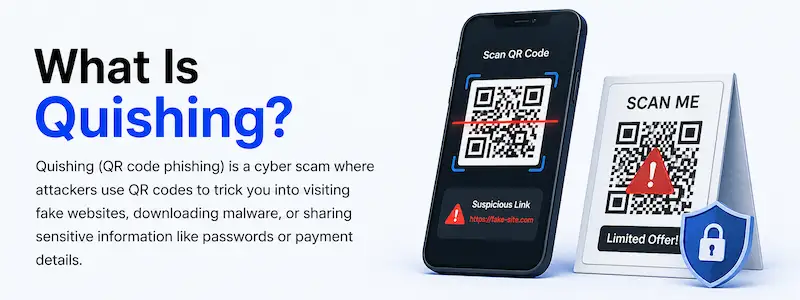
Let’s take a look at what Quishing is, its impacts, and how you can protect yourself against such attacks!
How Quishing Differs from Traditional Phishing Attacks?
|
S.No. |
Topics |
Factors |
What? |
|
1. |
Quishing |
Image-Based Redirection |
In order to conceal the target URL from conventional text-based security scanners that are unable to "read" or decipher the image information, the malicious link is encoded into a QR code image. |
|
Mobile-Centric Target |
Because it is practically difficult for a victim to examine the target URL before scanning the code with a smartphone camera, these attacks specifically take advantage of the mobile user experience. |
||
|
Bypassing Security Perimeters |
The threat often gets through via automated URL-filtering technologies that are meant to detect dangerous text links at the gateway level because it is transmitted as a visual picture (which can be printed on a flyer, attached to an email, or placed on a physical terminal). |
||
|
2. |
Traditional Phishing |
Text-Based Links |
Attackers employ buttons or URLs that are inserted into the body of an email, SMS, or message and are readily interpreted by common security gateways. |
|
URL Visibility |
Before clicking, the user can frequently perform a "sanity check" by hovering their cursor over a link to see the destination URL. |
||
|
Standard Gateway Filtering |
The majority of corporate email security solutions (SEGs) are quite good at scanning for suspicious redirects, evaluating text-based URLs, and comparing them to blocklists. |
How Does Quishing Work?
In the following ways, Quishing Works:
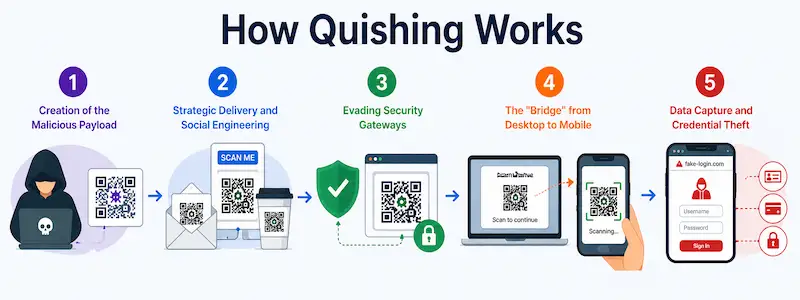
- Creation of the Malicious Payload: Attackers use readily accessible, trustworthy QR code creation software to include a malicious URL in a QR code.
- Strategic Delivery and Social Engineering: In order to fool the user into scanning the harmful QR code, it is frequently included with urgent instructions in phishing emails, fictitious invoices, or physical posters.
- Evading Security Gateways: The payload evades conventional email security filters, which lack sophisticated image processing and Optical Character Recognition (OCR) capabilities, because it is concealed inside an image file instead of a typical hyperlink.
- The "Bridge" from Desktop to Mobile: The attacker compels the user to go from a protected desktop setting, which might contain business security software, to an unmanaged mobile device, where security is frequently less robust.
- Data Capture and Credential Theft: The user's mobile device automatically opens a phony, look-alike webpage after scanning the code, prompting them to enter sensitive credentials that the attacker subsequently obtains.
The Growing Threat of QR Code Phishing in 2026
In order to get over outdated text-based security filters that are still unaware of image-based payloads, attackers are increasingly employing complex, visually stylized pictures, such as logo-embedded and fractured QR codes, in QR code phishing, which has become a major evasion strategy in 2026.
These campaigns have become a crucial "blind spot" that businesses are finding difficult to prevent since they take advantage of users' innate faith in QR technology and divert traffic from safe, controlled desktop environments to unmonitored mobile devices.
The Impact of Quishing on Businesses and Consumers
|
S.No. |
Factors |
What? |
|
1. |
Compromise of Corporate Networks |
By taking advantage of unmanaged mobile devices that are used to look for malicious code, attackers are able to obtain both initial entry and lateral access. |
|
2. |
Widespread Financial Loss |
Unauthorized bank transfers, illegal payments, or the dark web selling of credentials that have been obtained are examples of direct theft. |
|
3. |
Severe Reputational and Brand Damage |
When an avoidable security breach is revealed, organizations are subject to regulatory scrutiny and a substantial loss of customer trust. |
|
4. |
Exfiltration of Sensitive Data |
Attackers can immediately obtain confidential data, intellectual property, or personal identity records once a victim logs into a phony site. |
|
5. |
Operational Disruption and Recovery Costs |
For both individual victims and businesses, incident response, system cleanup, and legal remedies result in significant downtime and costs. |
Recognizing Quishing: Key Signs to Watch Out For
The following are the key signs to watch out for to recognize quishing:
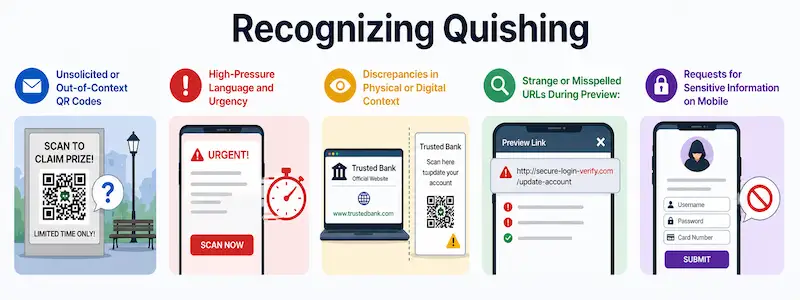
● Unsolicited or Out-of-Context QR Codes: Unexpected QR codes in emails or in strange public places with no apparent function should raise suspicions.
● High-Pressure Language and Urgency: Ignore messages that ask you to do anything right away, like "scan now to avoid account suspension" or "claim your prize before time runs out."
● Discrepancies in Physical or Digital Context: Make that the location of the QR code corresponds with the source, such as stickers over valid QR codes on parking meters or restaurant menus.
● Strange or Misspelled URLs During Preview: If the destination URL appears on your mobile device before it opens, carefully check it for minor mistakes or dubious domains that don't match the anticipated official website.
● Requests for Sensitive Information on Mobile: If scanning a code takes you to a page that asks for login credentials, multi-factor authentication codes, or financial information right away, proceed with care.
Essential Security Tools for Quishing Detection
The following are the essential security tools for quishing detection:
a) AI-Powered Email Security Platforms: Use machine vision and natural language processing to automatically identify and flag questionable QR code images in incoming emails.
b) Browser Emulation Sandboxes: Before the user can interact with the destination URLs included in QR codes, safely explode and examine them in a safe, isolated setting.
c) Multi-Modal Machine Learning Models: To correctly determine malicious intent, examine the QR code image's visual characteristics as well as the surrounding message's context.
d) Integrated Phishing Simulation and Awareness Training: To teach staff members how to identify and report harmful QR codes in real-world situations, conduct realistic "quishing" exams.
e) Mobile Endpoint Security (MDE): Install agents on mobile devices to scan and prevent access to phishing pages and known malicious URLs that are accessed through QR scans.
f) Advanced URL Filtering: To prevent traffic to domains linked to ongoing QR-based phishing attempts, security gateways should be updated with real-time threat intelligence on a regular basis.
Steps to Protect Yourself from QR Code Phishing
|
S.No. |
Steps |
What? |
|
1. |
Exercise Caution with Unsolicited Codes |
Regardless of the sender's identity, proceed with utmost caution when you receive an unexpected QR code over email, text, or social media. |
|
2. |
Inspect Physical Placement |
Because attackers frequently overlay their own malicious codes on legal ones, make sure that public QR codes are not placed over already-existing labels, stickers, or signs. |
|
3. |
Verify the Destination URL |
Before you let your browser load the entire page, take a moment to look at the URL that shows up on your screen after scanning. |
|
4. |
Avoid Submitting Sensitive Information |
Never enter personal information, financial information, or login credentials on a website accessed with a QR code unless you are positive of the site's legitimacy. |
|
5. |
Keep Devices Updated |
To take advantage of the most recent defenses against known phishing and malware threats, make sure the operating system and security software on your smartphone are up to date. |
The Future of Quishing: What to Expect and How to Stay Safe?
AI-driven, highly tailored assaults that dynamically create distinct, transient QR codes to get beyond static security filters will dominate quishing in the future, requiring a move away from traditional link scanning and toward behavior-based authentication.
Users must adopt a "zero-trust" attitude toward all scanned material in order to be safe, and businesses must give top priority to implementing mobile-native security solutions that offer automatic, real-time destination link verification.
Conclusion
Now that we have talked about Quishing, you might want to learn more about how you can evade such situations. For that, you can get in contact with Craw Security, offering “Phish Next,” a dedicated phishing simulation platform.
At this platform, practitioners can confront various real-life phishing attack simulations, and with time, they will be able to understand how to evade them with ease. What are you waiting for? Contact, Now!
Frequently Asked Questions
About Quishing
- What is QR code phishing quishing?
Quishing is a type of social engineering in which hackers insert harmful URLs into QR codes to deceive users into scanning them and going to phony websites intended to steal private data.
- What is the difference between phishing and quishing?
While quishing explicitly encodes these dangerous URLs within QR code images to get over regular security filters, phishing usually employs text-based links inserted in emails or messages to redirect victims.
- What is an example of quishing?
A phony, urgent email stating that your "package delivery is on hold" and displaying a QR code that, when scanned, takes you to a fraudulent website intended to steal your credit card information is an example of quishing.
- What are the signs of a phishing QR code?
The following are the signs of a phishing QR code:
a) Urgent or Threatening Context,
b) Suspicious Physical Placement,
c) Unexpected or Unsolicited Arrival,
d) Domain Mismatches, and
e) Requests for Sensitive Credentials.
- What is quishing awareness QR code phishing for passwordless authentication?
Because attackers frequently imitate these prompts to reroute users to phony login pages that steal their session tokens or credentials, quishing awareness for passwordless authentication entails teaching users to critically examine the origin and legality of QR codes used for "scan-to-login" flows.
- What are the 7 signs of phishing?
The following are the 7 signs of phishing:
a) Sense of Urgency or Threats,
b) Suspicious Sender Address,
c) Generic Greetings,
d) Suspicious Links or Buttons,
e) Unexpected Attachments,
f) Requests for Sensitive Information, and
g) Poor Grammar and Formatting.
- How common are QR code phishing attacks?
QR code phishing, also known as "quishing," has grown to be a significant security risk, making up 12% of all phishing attempts as of 2026. Between 2023 and 2025, the number of instances increased by 400%.
- How can we protect ourselves from QR code phishing?
In the following ways, we can protect ourselves from OR code phishing:
a) Verify Before You Scan,
b) Inspect Physical Integrity,
c) Preview the Destination,
d) Avoid Sensitive Inputs, and
e) Maintain Device Hygiene.
- What is a major risk of phishing attacks?
Sensitive data theft, including financial information, login passwords, or confidential company information, is a significant danger from phishing attempts and can result in identity theft and extensive system penetration.
- How to identify if a QR code is malicious?
In the following ways, you can identify if a QR code is malicious:
a) Check for Physical Tampering,
b) Verify the Source,
c) Inspect the Destination Preview,
d) Beware of High-Pressure Tactics, and
e) Analyze the Landing Page.