What Is Callback Phishing and How Does It Work?
Do you know what Callback Phishing is and how it can affect your daily work life with serious consequences if you ignore vital signs? If not, then you are at the right place. Here, we will talk about what callback phishing is and related prevention techniques in detail.
Moreover, we will introduce a reliable phishing simulation solution offered by a reputable VAPT service provider. What are we waiting for? Let’s get straight to the topic!
What Is Callback Phishing?
Callback phishing (also known as telephone-oriented attack delivery) is a social engineering strategy in which attackers send emails, frequently masquerading as legitimate services that provide fake invoices or account notifications, directing victims to call a specified phone number to address a problem.
Once the attacker has the victim on the phone, they employ convincing social engineering tactics to deceive the victim into either installing remote access software or disclosing sensitive credentials.
This method intentionally evades conventional email security filters, as the email does not contain any harmful links or attachment payloads. Let’s take a look at what Callback Phishing is, its techniques to victimize, and prevention techniques for security!
Telephone-Oriented Attack Delivery (TOAD) & Hybrid Vishing
Telephone-Oriented Attack Delivery (TOAD) and hybrid vishing refer to the same multi-stage threat strategy that combines initial email interaction with live phone-based social engineering. Using legitimate emails, perpetrators entice their targets into making a call to a control number. Once the victims make the call, they are convinced by call center agents to download malicious software, give remote access, or approve fake wire transfers.
How Does Callback Phishing Work? (Step-by-Step Process)?
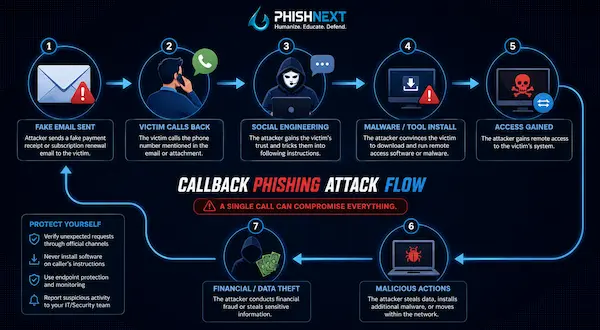
Callback phishing works in the following ways:
1. Initial Email Delivery: Perpetrators dispatch a legitimate-looking email containing a fraudulent invoice or subscription notification that pressures the target into calling a customer service number.
2. Victim Initiates the Call: The victim dials the specified number, thereby unwittingly establishing a direct link to a deceptive call center run by malicious individuals.
3. Social Engineering & Trust Building: The assailant poses as a well-meaning support agent, validating fraudulent account information to create a sense of trust and urgency.
4. Remote Access & Malware Installation: The perpetrator instructs the target to either download remote access applications (like AnyDesk or TeamViewer) or run a harmful payload.
5. Execution & Exploitation: Once access is secured, the attacker may steal sensitive credentials, move laterally across the corporate network, or deploy ransomware.
How does Callback Phishing differ from Traditional Phishing?
|
S.No. |
Topics |
Factors |
What? |
|
1. |
Initial Attack Vector & Delivery |
Traditional Phishing |
Depends on embedding harmful URLs or weaponized attachments (such as infected PDFs or macros) directly within the email to carry out the attack. |
|
Callback Phishing |
Utilizes “clean” text-only emails that lack links and attachments, presenting only a phone number to deceive the target into making contact. |
||
|
2. |
Method of Exploitation & Payload |
Traditional Phishing |
Credentials are harvested automatically through counterfeit login portals, or malware is deployed as soon as the victim accesses a file or link. |
|
Callback Phishing |
Involves social engineering tactics that require direct interaction between individuals via phone calls. The perpetrator plays a hands-on role in persuading the target to set up remote desktop applications or carry out payloads. |
Common Techniques Cybercriminals Use in Callback Phishing Attacks
The following are some common techniques cybercriminals use in callback phishing attacks:
● Fake Subscriptions & Invoices: Dispatching notifications of expensive bills (like from PayPal, Geek Squad) to incite fear and compel instant phone calls.
● Bypassing Email Security Filters: Removing links and attachments from emails so that security gateways categorize them as harmless text.
● Professional Fraudulent Call Centers: Running well-mannered, trained call centers that use scripted customer service methods to create immediate trust.
● Legitimate Remote Management Software: Deceiving targets into installing trusted tools (like AnyDesk, Quick Assist) to avoid antivirus detection.
● Hands-On-Keyboard Exploitation: Utilizing active remote access to carry out credential theft, defense deactivation, and network payload deployment manually and in real time.
Real-World Examples of Callback Phishing Scams
The following are real-world examples of callback phishing scams:
a) The BazarCall (BazaCall) Campaign: Led the way in phone-based phishing by using fraudulent subscription receipts to deceive targets into downloading BazarLoader malware.
b) Luna Moth (Silent Ransom Group) Extortion: Utilized fraudulent software renewal invoices to obtain remote access, extract sensitive corporate information, and issue ransom demands without the use of ransomware.
c) Fake Billing Overpayment / DevTools Scams: Alleged unintentional overpayments and used browser developer tools to deceive victims into transferring refund money during the call.
Initial Compromise Vectors: Ransomware and Remote Access Software
Initial compromise vectors provide cybercriminals with a crucial foothold, as callback phishing employs phone-guided installation of legitimate Remote Access Software (e.g., AnyDesk, TeamViewer) to create a persistent network entry.
Ransomware operators exploit this access to circumvent standard security measures, move laterally, and distribute harmful payloads throughout an organization’s infrastructure.
Why Is Callback Phishing Becoming One of the Fastest-Growing Cyber Threats?
Callback phishing is becoming one of the fastest-growing cyber threats for the following reasons:
1. Bypasses Secure Email Gateways (SEGs): Text-only emails do not contain harmful URLs or file payloads, making them easy to bypass automated email filters.
2. Exploits Inverted Trust Dynamics: By initiating the phone call themselves, victims create an illusion of control and security.
3. Evades Endpoint Antivirus via Living-off-the-Land (LotL) Tools: Instead of using flagged malware, attackers utilize legitimate and signed remote desktop software (such as AnyDesk).
4. Industrialized Fraud Operations: Trained, fluent agents in professionalized call centers enhance the scale of attacks, leading to high success rates.
5. High Ransomware ROI: When individuals can directly access the corporate network, breaches occur more rapidly, and ransomware groups can reap payouts more quickly.
Why Is Callback Phishing So Effective Against Businesses?
Callback phishing is so effective against businesses for the following reasons:
● Neutralizes Security Gateways: Automated email security filters allow plain-text emails that do not contain harmful links or attachments to pass through without hindrance.
● Exploits Employee Self-Service Habits: Employees are trained to handle billing or subscription issues directly through customer support phone lines.
● Bypasses Endpoint Security via Trusted Tools: Utilizing valid remote desktop applications (like AnyDesk or TeamViewer) prevents antivirus notifications from being activated.
● Capitalizes on Live Human Manipulation: With direct phone calls, perpetrators can exploit urgency, authority, and immediate persuasion to circumvent common sense safeguards.
● Fast-Tracks Network Intrusion: By setting up an active remote desktop session, assailants gain instant, hands-on access to internal company networks.
Industries Most Targeted by Callback Phishing Attacks
|
S.No. |
Industries |
What? |
|
1. |
Financial Services & Banking |
High-value target for direct monetary transfers, wire fraud, and account takeover. |
|
2. |
Healthcare & Life Sciences |
Due to strict uptime demands, urgent operational workflows, and sensitive data access, it has become a major target. |
|
3. |
Technology & Managed Service Providers (MSPs) |
Targeted to obtain privileged network access, remote management tools, and supply chain entry points into client networks. |
|
4. |
Manufacturing & Industrial Supply Chains |
Targeted to obtain privileged network access, remote management tools, and supply chain entry points into client networks. |
|
5. |
Legal, Professional Services, & Insurance |
Used for routine client billing interactions, phone communications, and confidential corporate communications. |
Warning Signs of a Callback Phishing Attempt
The following are the warning signs of a callback phishing attempt:
a) Unexpected Subscription or Invoice Emails: Getting renewal notices or receipts for large amounts for products or services you did not buy.
b) Urgent Demands to Settle via Phone: Conspicuous alerts stressing the necessity of an immediate call to the given number to avert charges or penalties.
c) Lack of Clickable Links or Attachments: Plain-text emails that include no downloadable files or URLs, with the phone number as the only call to action.
d) Requests to Install Remote Desktop Software: A telephone agent pushing you to install applications such as AnyDesk, TeamViewer, or Quick Assist to resolve a problem.
e) Requests to Modify Web Browsers or Share Screen: Individuals calling you who request that you open the developer tools (F12), share your screen, or provide login details on websites you don’t recognize.
How to Identify a Fake Customer Support or Invoice Call?
You can identify a fake customer support or invoice call in the following ways:
1. Unsolicited Direct Inbound Calls or Callback Prompts: The caller contacts you regarding an invoice or account issue that you did not initiate or ask for assistance with.
2. Demands for Remote Access Tools: The agent stresses that you should download apps such as AnyDesk, TeamViewer, or Quick Assist to fix the problem.
3. Urgency and High-Pressure Extortion: The caller resorts to aggressive, high-pressure tactics, threatening immediate account suspension, legal action, or financial loss.
4. Manipulating Web Browsers or Developer Tools: The agent requests that you open the browser's Inspect Element/Developer Tools (F12) to make manual changes to the dollar amounts or code shown on the screen.
5. Refusal of Verification Protocols: The caller will not allow you to end the call to return to official company phone numbers that are publicly available or to confirm their identity.
Essential Security Tools for Detecting and Blocking Callback Phishing
|
S.No. |
Tools |
What? |
|
1. |
AI-Powered Email Security (ICES) |
Examines the natural language context to identify linkless invoice emails that evade conventional filters. |
|
2. |
Endpoint Detection & Response (EDR / XDR) |
Identifies dubious, illegitimate executions of remote desktop tools such as AnyDesk or TeamViewer. |
|
3. |
Application Control & Ringfencing |
Prevents unapproved remote access software from being installed or from interacting with sensitive system files. |
|
4. |
SIEM / XDR Correlation Engines |
Links initial access notifications driven by phones with abrupt lateral network movement throughout logs. |
|
5. |
DNS & Web Security Gateways |
Limits outbound connections to domains deemed untrustworthy that were established during calls involving social engineering. |
Employee Security Awareness Training and Incident Response
Employee security awareness training prepares staff to identify social engineering warning signs like urgent callback prompts and unsolicited requests for remote screen control, while also limiting unauthorized software installations.
Combine this with a well-defined incident response workflow that allows for quick reporting, immediate session termination, and rapid isolation of compromised endpoints to eliminate threats before lateral movement takes place.
Conclusion: Stay Protected Against Callback Phishing with a Proactive Security Strategy
Now that we have talked about what Callback Phishing is, you might want to get your hands on a dedicated security solution to protect yourself against such phishing attacks. For that, you can go for PhishNext, a dedicated phishing simulation platform offered by Craw Security.
PhishNext can simulate various kinds of phishing attacks to teach users how such phishing attacks work and how they can protect themselves with ease. What are you waiting for? Contact, Now!
Frequently Asked Questions
About Callback Phishing
1. What is callback phishing in cybersecurity?
Callback phishing is a type of social engineering attack in which malicious individuals send clean, link-free emails containing fake invoices or alerts to deceive victims into calling a specific phone number.
Once the victim calls, a live operator manipulates them into providing remote access or installing malware.
2. How does a callback phishing attack work?
A callback phishing attack works in the following ways:
a) Initial Email Delivery,
b) Victim Initiates Contact,
c) Social Engineering & Trust Building,
d) Remote Access Exploitation, and
e) Execution & Compromise.
3. What is the difference between callback phishing and traditional phishing?
While traditional phishing employs harmful links or attachments in emails to automatically capture credentials, callback phishing utilizes legitimate-looking emails with phone numbers to deceive victims into calling a live assailant who manually directs them to provide remote access.
4. Why are callback phishing attacks increasing?
Callback phishing attacks are increasing for the following reasons:
a) Bypassing Advanced Email Security,
b) Inverted Trust Dynamics,
c) Rise of AI Voice Cloning & Automation,
d) Evading Antivirus with Legitimate Remote Tools, and
e) Emergence of "TOAD-as-a-Service".
5. How can businesses prevent callback phishing attacks?
Businesses can prevent callback phishing attacks in the following ways:
a) Deploy AI-Powered Email Security,
b) Enforce Strict Application Controls,
c) Train Employees on TOAD Tactics,
d) Establish Verification Protocols, and
e) Configure Endpoint & Network Monitoring.
6. What are the warning signs of callback phishing?
The following are the warning signs of callback phishing:
a) Unexpected Invoices or Subscriptions,
b) No Clickable Links or Attachments,
c) High-Pressure Phone Demands,
d) Requests to Install Remote Access Tools, and
e) Instructions to Open Developer Tools.
7. Can XDR detect callback phishing attacks?
Yes, XDR is capable of identifying callback phishing attacks by correlating suspicious behavioral telemetry across endpoints, identities, and networks, such as the unauthorized initiation of remote management tools like AnyDesk or TeamViewer in conjunction with unusual outbound connections.
8. Which industries are most vulnerable to callback phishing?
The following industries are most vulnerable to callback phishing:
a) Healthcare & Pharmaceuticals,
b) Financial Services & Banking,
c) Managed Service Providers (MSPs) & IT Services,
d) Manufacturing & Critical Infrastructure, and
e) Legal & Professional Services.
9. What should I do if I accidentally call a callback phishing number?
You should do the following tasks if you accidentally call a callback phishing number:
a) Disconnect the Call Immediately,
b) Refuse Remote Control and Close Software,
c) Isolate Your Device from the Network,
d) Report the Incident to Security/IT, and
e) Change Compromised Passwords and Monitor Accounts.
10. What security tools help protect against callback phishing?
The following security tools help protect against callback phishing attacks:
a) AI-Powered Email Security (ICES),
b) Endpoint Detection & Response (EDR / XDR),
c) Application Control & Ringfencing,
d) SIEM & Behavioral Analytics, and
e) Secure Web & DNS Gateways.