Top Signs of a Phishing Email You Should Never Ignore
Do you know how a Phishing Email targets potential victims and victimizes them to blackmail them to cause financial and data losses? If not, then you are at the right place. Here, we will talk about what Phishing Email and related risks in detail.
Moreover, we will introduce you to a reliable phishing simulation platform offered by a reputable VAPT service provider. What are we waiting for? Let’s get started!
What Is a Phishing Email?
A phishing email is a fraudulent communication sent by cybercriminals acting as a trustworthy entity such as a bank, a well-known firm, or a colleague, to deceive the receiver into revealing sensitive data.
In order to force consumers to click on harmful links, download malware-filled attachments, or divulge login credentials and financial information, these emails usually use urgent or frightening language.
In the end, they act as the main initial access point for more extensive corporate cyberattacks, such as the spread of ransomware and data exfiltration. Let’s take a look at what Phishing Email is, its impacts and potential targets in the IT Industry!
Why Are Phishing Emails Becoming More Dangerous?
|
S.No. |
Factors |
Why? |
|
1. |
Hyper-Personalization via Generative AI |
AI systems quickly create perfect, context-aware emails that are massively customized for certain recipients. |
|
2. |
Bypassing Multi-Factor Authentication (MFA) |
In order to get around security prompts, sophisticated phishing kits now grab active session tokens in real time. |
|
3. |
Polymorphic Campaigns Defeat Filters |
In order to evade conventional email security measures, attacks constantly alter code, URLs, and text variations. |
|
4. |
Multi-Channel Coordination (Vishing & Deepfakes) |
Hackers mix emails with AI voice clones and deepfake videos to optimize psychological deception. |
|
5. |
Exploitation of Legitimate Inboxes |
Because scammers take over hacked legitimate corporate accounts, it is hard to report fake emails as spam. |
The Role of AI and Deepfakes in Modern Phishing
The following are the roles of AI and Deepfakes in modern phishing:
1. Flawless Language and Tone Scaling: Removes grammatical problems and quickly translates incredibly convincing lures at scale across several languages.
2. Hyper-Targeted Social Engineering (OSINT Automation): Creates highly customized, context-specific phishing assaults by automatically scraping public social data.
3. Synthetic Voice and Video Cloning: Successfully poses as business leaders during live video chats by using deepfake audio and video.
4. Automated Adaptive Malicious Code: Creates dynamic landing pages that change their appearance and change virus code to get around security filters.
5. Scalable Business Email Compromise (BEC): Automates the drafting of very realistic urgent financial requests using a targeted executive's exact writing style.
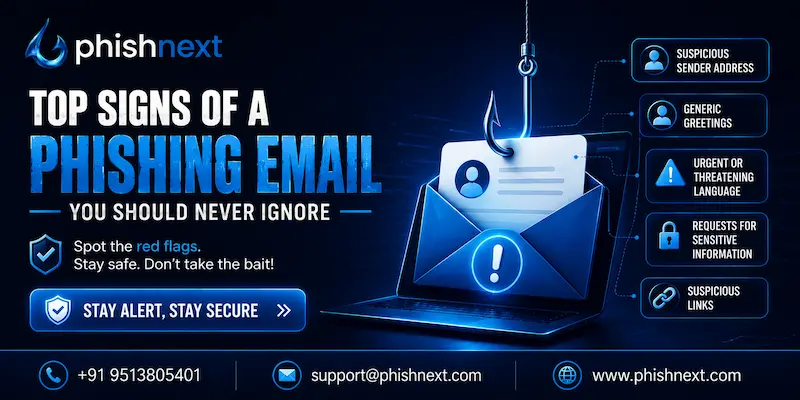
Top Signs of a Phishing Email You Should Never Ignore
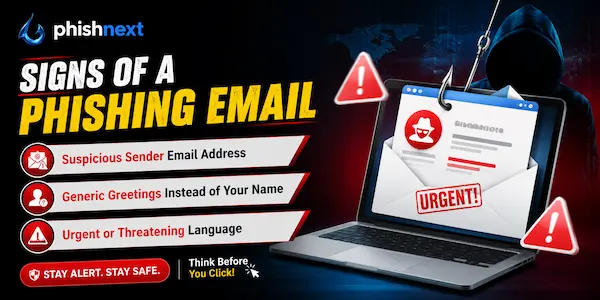
The following are the top signs of a phishing email you should never ignore:
● Suspicious Sender Email Address: The sender's domain name either contains subtle, intentional misspellings or differs from the official corporate name.
● Generic Greetings Instead of Your Name: The message casts a wide net by using ambiguous terms like "Dear Customer" instead of your real name.
● Urgent or Threatening Language: The email urges you to act promptly by threatening account suspension, legal action, or financial loss.
● Requests for Sensitive Information: Through email or unverified forms, the sender requests confidential information such as passwords, Social Security numbers, or banking credentials.
● Suspicious Links and Fake URLs: Hovering over the hyperlinked text exposes a mismatched, confusing, or wholly fake destination URL.
Common Phishing Scams Targeting Individuals and Businesses
|
S.No. |
Factors |
What? |
|
1. |
Business Email Compromise (BEC) |
Attacking a company email to pose as executives and fool staff members into sending money without authorization. |
|
2. |
Invoice Fraud |
Changing the billing information on fictitious or intercepted vendor invoices to divert company funds into fraudulent accounts. |
|
3. |
Spear Phishing and Whaling |
Sending extremely targeted, well-researched emails designed to trick high-level executives or particularly valuable employees. |
|
4. |
Brand Impersonation |
Stealing customer passwords and financial information by posing as reputable consumer organizations like Amazon, Microsoft, or Netflix. |
|
5. |
Tech Support Scams |
Tricking consumers into allowing remote device access by threatening them with fictitious virus infections or system lockouts. |
How to Verify Whether an Email Is Legitimate?
You can verify whether an email is legitimate in the following ways:
a) Inspect the Sender’s Exact Email Domain: To identify slight misspellings or spoof domains, look at the entire address that follows the "@" mark.
b) Hover Over All Links Before Clicking: Move your cursor over the text to reveal the actual destination URL and make sure it corresponds to the official website.
c) Verify Through an Independent Communication Channel: Instead of responding to the email, use a reliable, pre-saved phone number to call or message the sender.
d) Analyze Email Authentication Headers (SPF, DKIM, DMARC): Verify that the message passed important security authentication tests by looking at the technical email header data.
e) Look for Inconsistencies in Branding and Context: Scan for obsolete logos, mismatched fonts, or odd requests that contradict the company's typical operating processes.
What to Do If You Receive a Phishing Email?
You should do the following things if you receive a phishing email:
1. Do Not Click Links or Open Attachments: Interacting with harmful content can damage your machine or install malware right away.
2. Report the Email Immediately: Use the phishing reporting button in your company to forward the message to your IT security staff so they can assess the issue.
3. Flag and Block the Sender: To train security filters and prevent further emails from that address, mark the email as spam or junk in your email software.
4. Delete the Message Permanently: To reduce the possibility of unintentional engagement, delete the email from both your principal inbox and your trash folder.
5. Alert Coworkers If Needed: If the attack seems to be a part of a concerted, large-scale campaign aimed at your company, let your team or department know.
Best Practices to Protect Yourself from Phishing Attacks
|
S.No. |
Practices |
What? |
|
1. |
Enable Multi-Factor Authentication (MFA) |
In order to protect accounts even in the event that your password is compromised by a phishing link, require a second verification step. |
|
2. |
Deploy Advanced Email Security Filters |
Before sophisticated incoming phishing emails arrive in your inbox, use AI-driven security tools to instantly alert and stop them. |
|
3. |
Conduct Regular Security Awareness Training |
To teach staff members how to recognize and report contemporary, emerging social engineering techniques, conduct simulated phishing exercises. |
|
4. |
Keep Software and Systems Patched |
Update all operating systems and software on a regular basis to fix vulnerabilities that hackers use malicious attachments to exploit. |
|
5. |
Establish Strict Verification Protocols |
Make dual-authorization checks essential for any requests pertaining to financial transactions or sensitive data modifications. |
Tools and Technologies That Help Detect Phishing Emails
The following tools and techs help detect phishing emails:
● Behavioral AI & ICES: Analyze typical communication patterns to stop sophisticated text-based scams.
● DMARC, SPF, & DKIM: Prevent brand imitation and domain spoofing before emails arrive.
● AI Phishing Simulations: Automated, real-world simulated attacks are used to train staff.
● Brand Protection Platforms: Look for and take down phony corporate websites by scanning the internet.
● Warning Banners & Report Buttons: Provide users with a one-click reporting mechanism and include alert flags in potentially dangerous emails.
Conclusion
Now that we have talked about what Phishing Emails are, you might be thinking of a way to resolve such issues and evade such attempts. For that, you can go for PhishNext, a dedicated phishing simulator offered by Craw Security.
PhishNext can help users to learn how phishing attacks work, including phishing emails and ways to prevent such attempts. Thus, you can feel safer working online. What are you waiting for? Contact, Now!
Frequently Asked Questions
About Phishing Email
1. What are the most common signs of a phishing email?
The following are the most common signs of a phishing email:
a) Suspicious Sender Email Address,
b) Generic Greetings Instead of Your Name,
c) Urgent or Threatening Language,
d) Requests for Sensitive Information, and
e) Suspicious Links and Fake URLs.
2. How can I identify a fake email address?
You can identify a fake email address in the following ways:
a) Look for Lookalike Domains,
b) Check the Display Name vs. Actual Address,
c) Watch for Extra Subdomains,
d) Spot Subtle Typos, and
e) Inspect the Technical Header.
3. Why do phishing emails create a sense of urgency?
Phishing emails create a sense of urgency for the following reasons:
a) Bypasses Logical Thinking,
b) Exploits the Fear of Missing Out (FOMO),
c) Leverages Fear of Negative Consequences,
d) Discourages Independent Verification, and
e) Imitates Legitimate Corporate Workflows.
4. How can I check if a link in an email is safe?
You can check if a link in an email is safe in the following ways:
a) Hover (Don't Click) to Preview,
b) Use an Online Link Scanner,
c) Inspect the Domain Architecture,
d) Verify HTTPS and SSL Status, and
e) Test the Link in a Sandbox or Isolated Browser.
5. What should I do if I accidentally click on a phishing link?
You should do the following tasks if you accidentally click on a phishing link:
a) Disconnect from the Network Immediately,
b) Change Affected Credentials from a Separate Device,
c) Scan Your Device for Malware,
d) Report the Incident to Your Security Team, and
e) Enable Multi-Factor Authentication (MFA).
6. Can phishing emails look like they come from trusted companies?
Yes, attackers frequently utilize stolen logos, spoof domains, and accurate graphic reproductions of legitimate templates to make phishing emails appear to be from reputable businesses.
7. Is it safe to open attachments from unknown email senders?
No, it's never safe to open attachments from senders you don't know since they can utilize hidden code to infect your device with spyware, ransomware, or malware.
8. How can businesses protect employees from phishing attacks?
Businesses can protect employees from phishing attacks in the following ways:
a) Deploy Automated Email Security Tools,
b) Conduct Ongoing Simulated Phishing Training,
c) Enforce Phishing-Resistant MFA,
d) Streamline the Reporting Process, and
e) Establish Strict Financial Verification Policies.
9. What is the difference between spam and phishing emails?
Phishing is a dangerous, targeted attack intended to steal your private information or infect your device, whereas spam is simply unpleasant, unsolicited junk mail delivered en masse for advertising.
10. How can I report a phishing email?
You can report a phishing email in the following ways:
a) Use Your Email Client's Built-In Report Button,
b) Forward the Message to the National Cyber Agencies,
c) Notify Your Organization's IT Security Team,
d) Alert the Legitimate Brand Being Impersonated, and
e) Submit the Fake Link to Google Safe Browsing.